
Pattern validation in form fields
The illustrations show an earlier version of the interface. Use the steps in this guide for the available features and options.
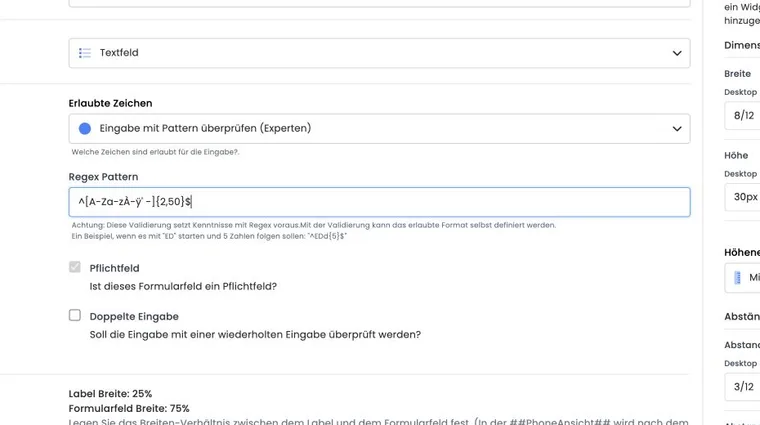
The Validate input with a pattern (experts) option lets you define your own permitted format for a text field. edoobox outputs the pattern as a validation rule in the public form. A value that does not match prevents valid completion of the form.
A pattern checks format, not authorisation. It can ensure that a membership code looks like ED12345, but cannot prove that this code actually belongs to an authorised person.
When the pattern option appears
In the Design Manager, open the Registration: Participant form template and edit a form field. Under Permitted characters, select Validate input with a pattern (experts). The Regex Pattern field then appears.
The option applies to text-based input fields. If the linked participant data field is defined as a selection, date or another non-text type, that field type takes precedence and the regex input is not available in the same form.
Set required status and length deliberately
Optional field: an empty input does not have to match a pattern. Therefore enable Required field if a value must always be present.
Pattern mode: edoobox does not generate a separate minimum/maximum length check in this mode. Include the required length directly in the pattern, for example using
{5}.Entire value: write the rule for the complete expected content. For clarity, use the start
^and end$anchors.
Enter regex correctly
Enter only the regular expression, without surrounding delimiters such as /.../ or trailing flags. Use ^ and $ if the entire value must match. Validation must work both in the public form and on the server; avoid expressions that only one of the two regex variants understands.
| Purpose | Pattern | Matches | Does not match |
|---|---|---|---|
| ED followed by five digits | ^[Ee][Dd][0-9]{5}$ | ED12345, ed12345 | ED1234 |
| Two letters, a hyphen and four digits | ^[A-Za-z]{2}-[0-9]{4}$ | AB-2048, ab-2048 | AB2048 |
| Location identifier and four digits | ^(ZRH|BER)-[0-9]{4}$ | ZRH-2048 | PAR-2048 |
Current server-side pattern validation is case-insensitive. Therefore, do not use it as a reliable rule for excluding lowercase letters. A custom pattern mode is not available for the permanently linked standard email field; its email format validation is predefined.
Check using a test matrix
Save the design and open the public preview in a private browser window.
Test at least one valid value.
Test values that are too short, too long or incorrectly written.
Test leading and trailing spaces.
Check an empty field, once as optional and once as required.
Repeat the test on a mobile device or narrow preview and in every language version you use.
Never change a pattern just before a live campaign without testing it. A single incorrectly escaped character can block every valid registration.
Do not use a pattern as the only access protection
A company domain or formally valid code is easy to reproduce. If only a known group of people may book, combine format validation with a suitable login, a protected offer or a substantive check. A pattern improves data quality but does not replace identity or authorisation checks.
Example: A fixed-length membership number
An association requires numbers in the format “ED” followed by five digits. The field is marked as required and assigned ^ED\d{5}$. Tests cover ED12345, a number that is too short, lowercase letters and input containing spaces. Both uppercase and lowercase letters are treated as permitted. Membership itself is still checked separately afterwards.
Example: Collect a location reference
A custom text data field collects an internal reference such as ZRH-2048. The pattern ^(ZRH|BER)-[0-9]{4}$ permits the two intended locations. Actual access authorisation is checked by a separately configured login or offer rule.
Example: An optional internal order reference
An order reference is optional but, if entered, must match the format ^[A-Z]{2}-\d{4}$. The field remains optional. Empty input is permitted; AB-2048 is valid, while AB2048 is rejected.
Combine format validation with the appropriate access feature
Before defining your own pattern, check whether edoobox already offers a suitable field type or substantive rule: email format with optional code verification, telephone number format with code verification, date or file-based input. For specifically linked standard fields, the format selection may be predefined.
For a price available only with a valid subscription, use the subscription restriction on the price category. A pattern such as ^ABO-[0-9]{6}$ only checks the format and confirms neither purchase, validity nor remaining uses of a subscription.