
Fully understand promotional campaigns and vouchers
A promotion consists of its campaign rule and codes. The campaign defines the value, application method and conditions; each code has its own activation status and a list of the bookings where it was used.
Sold vouchers use the same technical basis, but are generated automatically only after successful payment. Reliable administration therefore requires the campaign, individual code, booking, invoice and payment to be considered together.
Visibility and redemption field
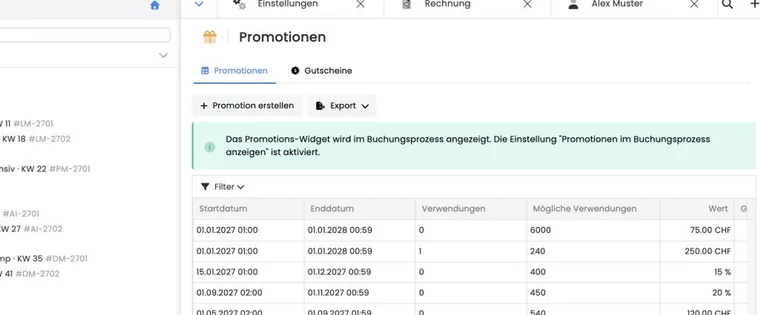
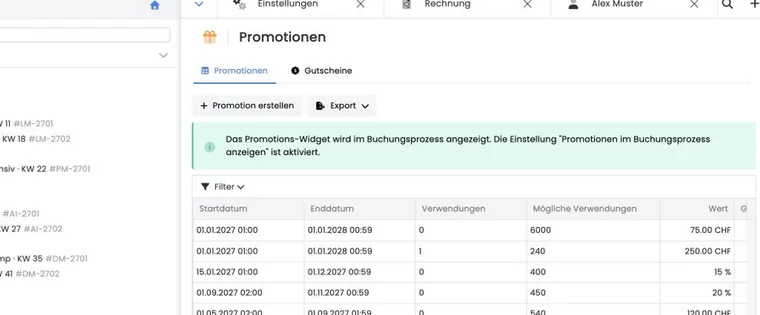
Under general offer settings, enable Display promotions during booking. The promotion overview shows the current state of this setting. The promotion code widget must also be present in the design template being used.
If the field is not visible, check the setting, assigned design, template and publication. A valid code is of no use to the person booking if the input is absent from their actual booking journey.
Application methods and calculation basis
Offer price reduction: an amount or percentage applied to price categories and, if applicable, selected lessons. Additional services are not automatically part of the discount basis.
Application to the booking total: a fixed amount applied to the appropriate total in the same currency. The final amount never falls below zero.
The invoice treats an offer price reduction as a discount line. Application to the total is treated more like a partial payment. Check VAT and accounting with your specialist and test the specific combination under Invoice and cancellation invoice.
Complete online validation of a code
When entered in the public booking process, edoobox checks, in order, code activity, period, maximum redemptions including current reservations, tag conditions, booking type, email/domain rule, hierarchical scope, currency and minimum booking value.
A category’s scope includes its subordinate offers. Tag conditions require login and can be satisfied by direct profile tags, tags from bookings outside the waiting list and SAML tags. Multiple positive conditions must all match; a negative match blocks access.
Generate, import and manage codes
When first created, a single code can consist exactly of the code text, which has a maximum length of ten characters. For multiple codes, edoobox adds random characters up to a maximum of 15 characters. No more than 500 codes are possible per generation.
For CSV import, enter one code per line. After reading the file, select the rows to import in the preview and check their activation status before starting. The import processes the selection in smaller batches.
The code table shows the status, code and usage count. Open a code to see its linked bookings, copy it, or activate or deactivate it.
Distinguish the overall limit from once per person
The setting How often may each individual code in this promotion be redeemed? limits that code’s total uses. Usage is counted across all people and matching bookings, including current reservations. A shared code with a limit of 100 therefore does not mean “100 people once each”. The same person can also use it again as long as the other conditions and overall limit allow it. There is no additional “at most once per person” selection in this setup.
For an offer with one single-use code per person, create or import different codes with a usage limit of 1 and distribute exactly one code to each eligible person. Such a code is not yet technically bound to that person. If the recipient address should also be restricted, configure the appropriate email condition in a separate campaign for that person. A company domain or shared customer tag restricts the target group but does not prevent the same person from redeeming a reusable code a second time.
A reusable amount is not a declining credit balance: a code with a fixed value and multiple permitted uses applies its configured value again for each eligible redemption. It does not maintain a shared remaining-value account across all bookings. For a value purchased once, instead use the documented remaining-value handling.
Edit and organise campaigns
Changes to the name, period, scope, application method, value, minimum amount, booking type, domains and tags are saved directly in the editing dialog. The currency is locked after creation.
Promotions cannot be deleted. Their time-based state follows from the start and end; the overview filters by ongoing, scheduled and expired. For an ended campaign, set an appropriate end date and disable any individual codes at risk.
Assign a code to a booking afterwards
Admins can select a promotion and code in an existing booking or remove the assignment. The price and booking data are then recalculated; existing invoices and outstanding balances must be substantively checked and corrected if necessary.
Edit the remaining value of an application to the total
For Settlement with booking total and a fixed amount, select under Remaining value of a promo code what happens with an unused amount: Remaining value expires, credit the full promo code value to the user account, or create a new promo code for the remaining value. This selection is not intended for pure offer price discounts and percentage discounts.
Example: A CHF 100 voucher code is used for a CHF 80 booking. Depending on the setting, the remaining CHF 20 expires, remains as a positive participant balance or is issued as a new code. In user account mode, the full code value is credited and the current booking is paid from that credit. The original code still follows its usage limit.
The complete setup, invoice check, and email check is explained in Vouchers: Remaining values and credits.
Distinguish sold vouchers from remaining balances
After successful payment, edoobox creates a separate promotion with one code for a voucher purchase. Such a code is generally redeemable once and restricted to the sales currency. The sold voucher is usually valid for 1080 days after code creation.
Single use of the original code and handling its remaining value are two separate settings. For fixed amounts applied to the booking total, you can specify whether an unused amount expires, remains as participant credit or is issued as a new code. Check the specific campaign setting before promising or ruling out a remaining balance.
An offer price reduction does not have this remaining-value workflow. See Remaining values and credit and Sell vouchers for details.
Communicate codes securely
Treat unredeemed codes as confidential values. In the accompanying text, always state the period, eligible offers, minimum value, booking type, single or multiple use, and contact route for problems.
The promotion summary shows a campaign-specific placeholder such as ##Promotion[promotion_id]##. Only use it in templates whose sending workflow has been checked for promotions. A test send must confirm that the expected code is generated or output for each recipient.
Use cases
Example: A code is temporarily blocked
A single-use partner code has been entered in a booking that is still in the countdown. A second person receives a message saying that the maximum usage has been reached. Administration waits until the reservation ends and then checks whether the first booking was completed instead of creating a second identical code.
Example: Administratively add a forgotten discount
A participant reports a forgotten code. The admin manually checks the period, eligible offer, normal booking type, domain, tags, activation status and previous uses. Only then do they assign the code and check the balance and existing invoice.
Example: A category discount after moving an offer
A promotion applies to the Continuing education category. An offer is moved to another category and is therefore no longer within the hierarchical scope. After changing the structure, the team performs a test booking and only explicitly adds the offer if the promotion should continue to apply.
Combine promotions with memberships and passes
A promotion code and a membership or pass benefit are not simply added for the same person and price position. edoobox compares the applicable monetary benefits and uses the larger one. In case of equal positive benefit, the promotion wins. A limited pass usage can be preserved thereby, provided the pass is not simultaneously used as an access requirement.
Example: The offer costs CHF 100. A member price gives a CHF 20 benefit, while the promotion gives CHF 10. The applicable CHF 20 benefit is deducted, rather than a combined CHF 30. For group bookings, check each person; for additional services, check the calculation basis. Different currencies are not converted for this comparison.
A redemption code for a membership or pass may appear in the same input field, but is not a freely configurable voucher. The setup and usage is explained in Passes and redemption codes.
Check the conditions of a remaining value separately
Participant credit and a new code for the remaining value inherit the original code’s restrictions differently. Credit becomes a separate balance without the original offer restriction or expiry. A new code receives its own promotion with a minimum booking value of 0; customer tag conditions are not copied automatically. For restricted campaigns, check the restrictions actually created. For the complete process, see Vouchers: remaining values and credit.