
The edoobox account: Subscription, billing, and GDPR
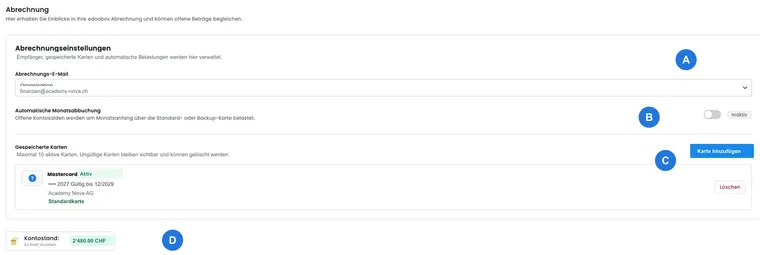
In the edoobox account, you manage everything relating to the relationship between your organization and edoobox: subscription, usage, billing, account balance, payments, invoices and data protection agreement. These areas are separate from your participants' payments.
Configure payment methods for your customers' bookings under Payment systems for participant payments. Account payments to edoobox, by contrast, are maintained in the account area.
Check and change your subscription
The Subscription area shows which edoobox subscription is currently active. Check usage, available features and possible changes there. If a change is unavailable, this is often due to active usage, contract terms or features not included in the smaller subscription.
For details about subscription, usage and changes, see Subscription settings. A general overview of packages is available under edoobox subscriptions.
Billing and account balance
Billing shows charges, credits, deposits, documents and the current account balance. This helps you understand which costs arose and which payments were received.
You can export the history for accounting or internal review. The detailed guide is Account: billing and account journal.
Record a payment to edoobox
Account payment lets you deposit credit or create an invoice for the edoobox subscription. In the payment form, choose bank transfer, a saved usable credit card or a new credit card. For bank transfer, first create an invoice; the account balance increases only after the incoming payment is posted.
Managing payment details, credit cards, EU VAT and GDPR settings is described under Account: payment, GDPR and EU VAT. To create a subscription invoice yourself, read Your edoobox subscription – create your own invoice.
Data protection agreement and GDPR
The account area contains the data protection agreement or data processing agreement with edoobox. Check the details and sign the agreement online if your organization requires it.
Do not confuse this agreement with the legal texts participants accept during booking. Maintain these texts separately under Settings: legal texts and Legal texts.
Recommend edoobox
Information about referrals and possible discounts is available in a separate guide. First check the participation terms currently offered; these do not imply an automatically available bonus or introductory promotion in today's account billing.
Find more information under Recommend edoobox and receive a bonus.
Practical example: Prepare account billing for the accounting team
Open the account billing area, check the balance and monthly groups, export the required period and download the relevant documents. If an expected deposit is missing, first compare the bank or card receipt and payment reference with the account journal. Ask support to clarify a payment that has already been made but not yet allocated before paying again.
Distinguish account subscriptions from participant subscriptions
Your edoobox account subscription defines your organization's software package. Configure subscriptions sold to your customers in the Subscription Manager for participant subscriptions. A company card for edoobox account costs does not thereby become your participants' payment source.
The separate tasks are described under Company card, monthly debit and Business top-up and Pause or delete an account.