
GeoDynamic VAT
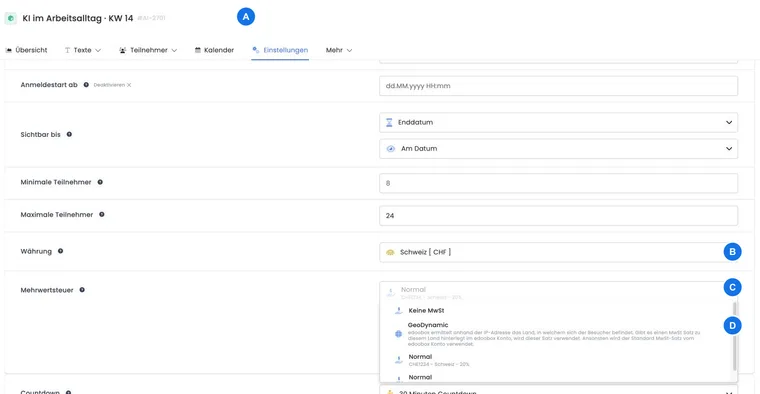
With GeoDynamic, edoobox selects an offer's VAT rate based on a country. This feature is intended for offers where the same tax rate does not apply to every booking. It does not replace tax assessment: your organisation must determine which countries and rates are needed in practice.
GeoDynamic is a property of the offer or its price calculation. Maintain the available rates under Settings → VAT.
Which country and rate are used
Until a country has been selected, the initial display may use location detection. This is only a provisional selection.
When the person making the booking selects their country, edoobox can redetermine the dynamic VAT for that country.
If the billing country is configured as the country basis in the billing address widget and an active billing address exists, that country may determine the update. Alternatively, the participant's country can be selected as the country basis.
If edoobox finds an active VAT rate for the applicable country, that rate is used.
If the country has no active rate, the selection falls back to the VAT rate marked as Default in the account.
Configure each country unambiguously: The current selection process has no priority list configurable in the interface for multiple active rates in the same country. For GeoDynamic, therefore configure exactly one appropriate active rate per country.
Set up GeoDynamic
Create or edit the required rates under Global VAT settings.
Assign the correct country to each country-specific rate and activate only the entries actually used.
Mark a reliable fallback as Default.
In the relevant offer or pricing logic, select GeoDynamic instead of a fixed rate or no VAT.
Activate the Country participant data field if people should confirm their country themselves.
Deliberately choose participant country or billing country
In the Billing address widget, the Reverse Charge country basis option determines whether the billing country or participant country is used for the current tax and B2B checks. This choice is particularly relevant when someone lives in one country but the paying company is based in another.
| Country basis | Typical purpose | Check |
|---|---|---|
| Billing address | Tax treatment should be based on the invoice recipient. | The billing address must be active and contain a valid country. |
| Participants | The participant's country determines your process. | Collect the participant country as a mandatory field. |
Agree this setting with your tax adviser and document internally which country basis applies to which types of offers.
What is saved for bookings and invoices
The booking saves the VAT data used, including its type and country reference. Supported changes to the country or billing address can redetermine the dynamic selection while editing a booking. However, this does not automatically turn an invoice already issued into a correctly adjusted document.
If you change a country afterwards, check the booking total, VAT breakdown, reverse charge status and invoice. For an incorrect document already issued, use the designated invoice or cancellation invoice process.
Check additional services and reverse charge separately
Additional services and other price components may have their own VAT assignments. Check each additional service and the resulting invoice, not just the offer price.
A B2B rate assigned to a country may also permit Reverse Charge. However, reverse charge only becomes active when the billing address, customer type and VAT number also meet the configured conditions.
Test GeoDynamic reliably
A country with its own active rate: that rate appears on the booking and invoice.
A country without its own rate: the rate marked as default is used.
The participant country and billing country differ: the selected country basis determines the outcome transparently.
Prices including and excluding VAT: gross, net and tax amounts remain understandable.
B2B and B2C: reverse charge applies only in the intended business case.
Example: online course in three countries
A provider maintains one active rate each for Switzerland, Germany and Austria, and marks the Swiss rate as default. The offer uses GeoDynamic. Test bookings with all three countries show the expected rate; a fourth country without an entry visibly falls back to the default rate.
Example: German employee, Austrian billing address
The person lives in Germany, while the invoice goes to the Austrian branch. The widget uses the billing address as the country basis. A test booking checks that the Austrian rate is selected and that changing back to the participant country would produce the German rate.
Example: discover a missing country rate before launch
The test matrix reveals that a booking from France falls back to the default rate. The team clarifies the tax treatment, creates exactly one active French rate and repeats the booking and invoice test before publishing the offer.
Document default changes and test cases
GeoDynamic needs a reliable active default rate for the fallback described. To replace it, first select another active rate as default; the existing default marker cannot simply be disabled without a replacement.
For a test case, record the participant's country, active billing address, selected country basis, rate used and tax amount. After form changes, this lets you trace which country information affected the price calculation.