
Cookie banner
The illustrations show an earlier version of the interface. Use the steps in this guide for the available features and options.
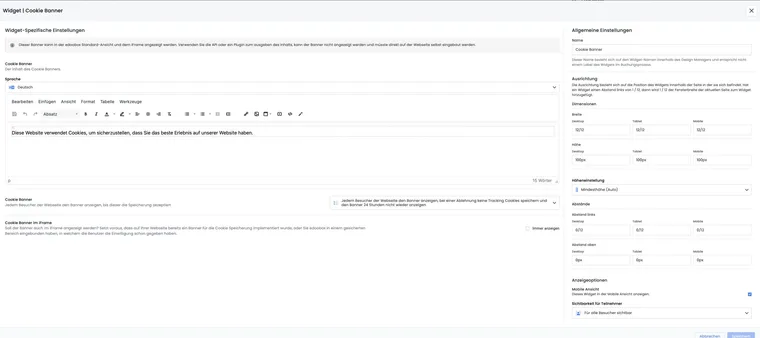
The cookie banner in the edoobox booking process helps you obtain consent for tracking scripts and cookies. The designated edoobox integrations respect this consent. You must additionally check your own code and externally embedded code.
The banner does not replace a legal review of your website. Clarify with your data protection lead which services you use, what notices are required and whether your main website also uses a cookie banner.
When the cookie banner is useful
The cookie banner is particularly relevant if you use Google Tag Manager, Analytics, Social Widgets or similar services during edoobox booking. These services should not load without consent.
Technically necessary edoobox session cookies remain separate. They allow the booking process, login or current session to function correctly.
Add the cookie banner in the Design Manager
In the Design Manager, add the cookie banner to a suitable template, often the booking process footer. Then check its display in the offer overview, offer details, participant form and payment page.
Behaviour when consent is refused or granted
Without consent, the designated optional edoobox tracking integrations remain inactive. This may prevent Social Widgets or e-commerce tracking from running.
If the person consents, the designated scripts and cookies load. Then use a test booking to check that tracking, e-commerce events and Social Widgets work as expected.
A cookie decision does not replace confirmation of participation terms at booking completion. Maintain their versions under Legal texts and configure confirmation in the design separately.
Important options
Show again after refusal: Decide whether the banner reappears on the next page or remains hidden for a period.
Also display in an iFrame: Check consent on the embedded page as well. A banner on your main website does not automatically pass its choice to edoobox; any supported transfer must be configured and checked separately.
Texts per language: Adapt the default texts and link to your privacy policy if required.
Technically necessary edoobox cookies
edoobox uses session cookies for booking and login, including edsesa and edsess. Their exact lifetime depends on the session and login method. The banner decision and additional cookies from embedded services are separate.
In the actual browser, check both direct edoobox access and website embedding: cookie name, domain set, purpose and expiry may vary with login, embedding and third-party provider. Use the values from your specific installation in your website's cookie information; a blanket two-hour statement does not cover every login method.
Test the cookie banner
Test the banner in a private browser window or after deleting existing cookies. Check three cases: no choice, refusal and consent. Then check that tracking scripts load only after consent.
If edoobox is embedded in an iFrame, also test the page containing it. Deliberately decide whether the banner should appear on the website, inside the iFrame or in both areas.
Practical example: Load Google Tag Manager only after consent
A provider uses Google Tag Manager for booking statistics. The cookie banner is added to the booking process footer. Tracking remains inactive on refusal; on consent, Tag Manager loads and the test booking appears in the report.
The banner controls the designated edoobox integrations. It does not automatically control a custom script, an external WordPress plugin or your main website's cookie banner. Therefore, check consent both in the directly opened edoobox process and on the actual website where it is embedded.
- Open the banner in the Design Manager and maintain the banner text in every active language.
- Choose the desired behaviour after refusal and specify whether the banner also appears in the iFrame.
- Save the text in the editor and the widget settings. Then test Reject and Allow without saved consent.
- After making the decision, open another booking page and check the saved behaviour.
The lifetime of technically necessary session cookies depends on the specific session and browser context. Use a cookie inventory of your actual integration when publishing names and storage periods.
If the banner or consent does not work as expected
In the selected design, check the banner type, Cookie banner in iFrame and texts in every language. Test the decision in a new browser context: previously saved consent may hide the banner. A banner on your main website does not automatically pass its choice to an embedded edoobox page. Custom code and external integrations must respect the intended consent themselves. After changing the banner or tracking, test consent and refusal again.