
Registration types
The registration type in edoobox involves two independent decisions:
Does a person book the entire offer or select individual dates?
May a booking contain multiple participations, and are their names recorded immediately or later?
You find these switches in the offer under Settings. Check the selection before the first booking, as existing bookings prevent switching the free date selection.
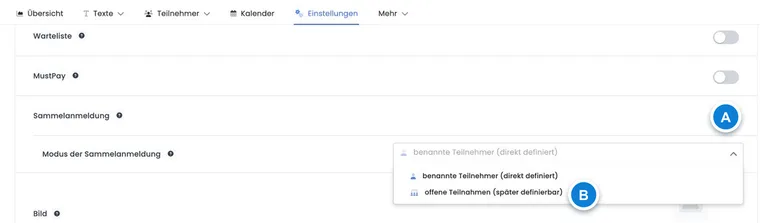
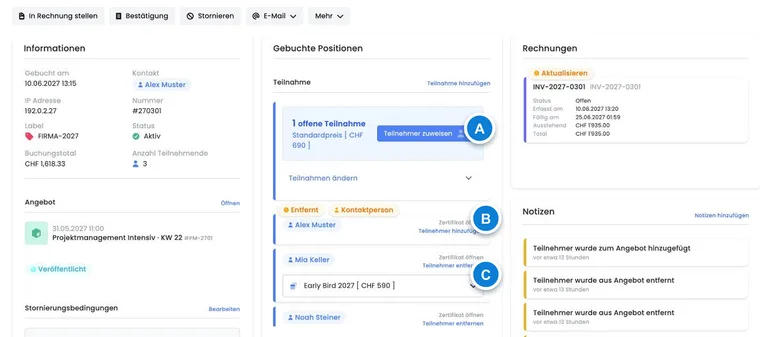
For illustration only: The current selection additionally includes the named mode first person as contact person. The table and instructions below explain all three entry points.
Decision matrix
| Question | Selection | Result |
|---|---|---|
| What is booked? | Normal registration | The offer with all scheduled dates as a unit. |
| What is booked? | Free date selection | Individual dates or modules from the same offer. |
| How many people? | Group registration off | One participation per booking. |
| How many people? | Named participants | Multiple people are recorded directly with their data. |
| How many people? | Unnamed participants | First, a number is booked; names are assigned later. |
Normal registration for a cohesive offer
With free date selection disabled, participants book the offer as a whole. If multiple dates belong to the course, they are part of the same registration. Price, minimum, and maximum apply to the complete process.
Suitable for:
multi-part courses with a fixed program;
workshops, camps, trips, or exams;
offers where all dates must be attended together;
processes with a waiting list or inquiry list.
Free date selection for individual dates
With free date selection, the booking person selects individual dates. The price is built up based on the selected dates or modules. In the offer dashboard, the theoretical total capacity is derived from the maximum number of places and the number of dates; however, each date remains booked separately.
Suitable for recurring lessons, trainings, consultation hours, or modules that can be attended independently. If dates have completely different content, prices, or target groups, separate offers are often clearer.
Protection rules for free date selection
The feature must be available in the subscription.
It cannot be enabled while a waiting list is active.
It cannot be enabled while an inquiry list exists for the offer.
Conversely, a waiting list cannot be enabled while free date selection is active.
The mode can no longer be changed with existing bookings. Even cancelled old processes can prevent a safe switch.
Multi-offers and their sub-offers use their own selection and capacity logic.
MustPay is a separate payment rule and is not automatically disabled. When combining, test in particular date reservation, countdown, payment interruption, and release of places.
The three entry points to a group registration
Group registration is an additional decision to normal registration or free date selection. Select one of three modes in the offer:
| Mode | How the public process starts | Example |
|---|---|---|
| Named participants, defined directly | The first person can participate themselves and record additional people. | Family or team leader with their own participation. |
| Named participants – first person as contact person | In Bootstrap 5.3, the first person is initially only a contact. A separate participant block is prepared. | HR books employees, parents book children. |
| Unnamed participants, assignable later | Number and price categories are booked; the assignment is supplemented later. | Company buys an unnamed quota. |
The contact person remains responsible for the booking process. The mode first person as contact person sets a starting selection in the new design; check the actually participating persons in the summary. The instructions named group registration and open participations contain the steps and examples.
Which limit applies when adding people
edoobox compares:
free places in the offer or in the selected date;
the global maximum of active group participations per booking;
already active participations in this booking process.
In the regular booking process, available offer places and the remaining global booking limit determine how many additional participations can be added; the lower value applies. When an administrator adds participants to an existing group booking for a full offer, an explicit overbooking confirmation may be offered. Reactivation, however, requires available places. The global booking limit remains binding in both cases. If group registration is disabled for the offer, no further participation can be added. The global input 0 is currently saved as 1; use the offer setting to disable group registration and check the limit after reloading.
You configure the global limits under Group registration: global settings.
Test the registration type before the first real booking
Build the date and price structure with the desired mode.
Consciously combine waiting list, inquiry list, MustPay and group registration.
Use a prepared demo offer whose status, registration period and capacity allow a public booking. Test a single-person booking and the largest permitted group booking there.
Check free places, dates, and booking value in the offer dashboard.
Check participations, price categories, and selected dates in the booking dashboard.
Apply the checked settings to the actual offer and publish it once setup is complete.
Use case: Fixed weekend course
A first aid course takes place on Saturday and Sunday; both days are mandatory. The administration uses normal registration and disables group registration. A booking reserves a spot for the entire weekend and receives a total price.
Use case: Yoga with freely selectable lessons
An offer contains twelve Tuesday sessions. Free session selection is active, and the waitlist and request list are disabled. A test user books three sessions; price and spot consumption are checked per selection. An aborted MustPay test must release the reserved spots according to the intended process.
Use case: Company reserves ten unnamed spots
A seminar uses standard registration with group registration in unnamed-participant mode. The contact person books ten places. Two weeks later, the administration assigns eight names; two places remain unnamed. The booking dashboard still shows one booking with ten active participants.
Plan subscription prerequisites additionally
A subscription restriction on the price category supplements the registration type. It determines eligibility and usage for each participation. Plan early whether named participants must be identified when booking and whether unnamed places are suitable for your specific subscription price. The guide Booking and using subscriptions explains the requirements.