
Settings: subscription
The Settings > Subscription section shows which edoobox plan is active, the account's current usage and the available switching options. This view supplements edoobox subscriptions and The edoobox account: subscription, billing and GDPR.
Check this section before an upgrade, downgrade, go-live or major campaign. A plan change can affect features, limits, email templates, internal offers, certificates, integrations and billing.
Access and layout
Open the global settings and select Subscription. You can view the current subscription, currency, monthly price, usage, available plans, payment status, account balance and notices about possible changes.
When this section opens, edoobox loads the account settings, available subscriptions, the current subscription status and relevant usage data such as offers, request lists, scheduled visibility, scheduled registration start and certificate validation. This allows the interface to check whether the target plan fits current usage before a change is made.
If the section is missing or an access message appears, check the admin permissions. Not every admin is allowed to edit agreements, payments or subscriptions.
Current subscription and usage
The current subscription block shows the active plan's name, currency and monthly price. Below it are components with their current status and value in the subscription. Numeric values appear as limits; very high system values such as 99999 appear as unlimited. Feature switches show whether a feature is actively included in the plan.
The usage card provides early warnings. It considers active offers, request lists, participants and price categories, among other things. Unlimited values are treated differently from actual limits in the usage calculation to avoid distorting the percentage display.
| Area | Why check? |
|---|---|
| Active offers | Too many active offers can block a downgrade. |
| Request lists | Limited request processes must be reduced before switching. |
| Price categories | Smaller plans may not include a large number of price variants. |
| Participant data structure | Advanced data fields or structures may depend on the plan. |
| Certificates and URL | Signed certificates or custom URL functions require appropriate plans. |
Example: check subscription usage before a downgrade
Open Settings > Subscription and compare the current status in the table with the value in the target subscription. If the current value for offers, request lists, participants or price categories exceeds the allowance, usage must first be reduced.
Participants and price categories per offer: The participant value is the highest configured maximum number of participants of a considered offer, not the total number of your customer profiles or all previous bookings. For price categories, the highest number of active price categories in a considered offer is counted. Therefore, in case of a change block, check the capacity or the active price categories of the affected offers; deleting arbitrary customer profiles does not resolve these limits.
Change subscription
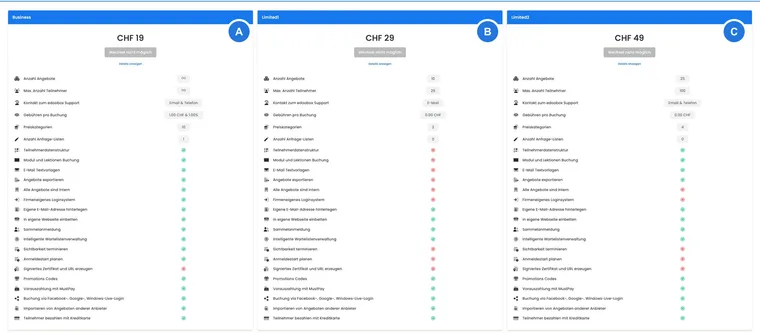
Selecting Change subscription makes edoobox open the subscription manager as a dialog over the current page. Available plans are sorted and displayed as cards. The active plan is marked and cannot be selected again; other plans may be selectable or blocked because of current usage.
Consider more than the price when switching. Features, limits, support level, booking fees, price categories, request lists, internal offers, email text templates, group registration, MustPay, promotion codes, your own email address, integration into your own website, social login and other plan components are all relevant.
After a successful change, edoobox opens a receipt or summary. It shows the new subscription, billing information for the previous subscription and the current account balance.
Compare subscription cards
The subscription cards show quantity limits and feature entitlements. They include offers, participants, support, fees per booking, price categories, request lists, participant data structure, module and lesson booking, email text templates, offer exports, internal offers, a company login system, your own email address, integration into your own website, group registration, intelligent waiting list management, scheduled visibility, scheduled registration start, signed certificates and URL, promotion codes, MustPay, social login booking, offer imports and credit card payments.
Icons, labels and tags show whether a value is included, limited or unlimited. For support, the technical value is converted into understandable options, such as email or email and telephone.
Document internally why a plan was chosen. This makes later decisions about growth, downgrades or account reviews much easier.
Waiver of the right of withdrawal for EUR accounts
Accounts using EUR may require additional consent to early commencement of services when changing subscriptions. The paid change remains blocked until the checkbox is confirmed.
Read the notice in the dialog carefully. Without consent, edoobox cannot complete the change. This checkbox is not always displayed for accounts using a currency other than EUR.
Why a change may be blocked
Before a change, edoobox checks whether current usage fits the target subscription. Numeric values must not exceed the target subscription's limits; active features must be included in the target subscription. If a condition is not met, Change not possible or a detailed notice appears.
Select Show details to see which components are affected and which current value prevents the change. Disabled buttons should therefore not be understood as errors: they show which usage or feature must first be addressed. This lets you identify whether you must first reduce offers, deactivate price categories, change internal categories or remove login/export functions.
Typical blockers include too many active offers, request lists, participants or price categories, an active participant data structure, active export functions, internal offers, module and lesson booking, company login, scheduled visibility, scheduled registration start or certificate validation.
Example: unblock a downgrade
A downgrade is blocked because there are too many price categories. The administrator opens the affected offers, reduces or deactivates unnecessary price categories and then returns to Settings > Subscription. The change can only be started again once usage is below the target limit.
Trial account, suspension and account balance
An extension code may be available for trial accounts. After it is entered successfully, edoobox updates the trial end date, displays a success message and returns to the normal workspace.
For suspended or blocked accounts, the subscription page may also display an account balance card. If a subscription must first be selected again, edoobox indicates this. If the balance is negative, edoobox provides access to payment there. In the current payment form, choose bank transfer, a saved card or a new card. Sofort/Klarna is no longer offered as a regular option for this account payment workflow.
For details about credit, invoices and payments, see Your edoobox subscription – create an invoice yourself, Account: payment, GDPR and EU VAT and Account journal.
Move from a trial to a paid account
Select the paid plan in the account you have already set up if you want to continue using the offers, people, templates and settings created there. The plan change continues that account. An additional newly registered account has its own data and does not automatically inherit this setup.
- Check the organisation name and account abbreviation of the trial account.
- Review offers, people, bookings, payment data and templates. Decide what should continue in production and which test data needs to be cleaned up.
- Open Settings → Subscription, compare the target plan and confirm the change under the displayed terms.
- Check the receipt, active plan name, account balance and required features.
- Reopen the same offers and profiles and check the production booking workflow, including email and invoices.
Changing plans does not clean up test data. Trial bookings, manually entered test payments and issued invoices must be deliberately handled using the financial correction workflow. For people and offers, follow Clean up test data. A trial extension or individual credit only applies if shown in the specific account or confirmed explicitly.
What happens after the change
After a successful change, edoobox displays a summary or receipt. It shows the new subscription, billing information for the previous subscription and the current account balance.
If the new subscription includes usage-based charges, an additional notice about transaction fees and accounting may appear. Then check the account balance, account journal and, where applicable, the subscription invoice.
The account settings and subscription status are then updated. This causes feature notices in other sections to be reassessed, for example upgrade notices for features that are not included or limits that have been reached. Many upgrade notices lead directly back to this subscription view.
Typical use cases
Before going live, check that active offers, request lists, participants and price categories fit the plan.
Switch from a trial or suspended account to a paid subscription and clarify the account balance beforehand.
Plan a downgrade and understand which active feature is blocking the change.
Compare plans by features such as email text templates, participant data structure, internal offers, certificate validation or company login.
Distinguish account subscriptions from participant subscriptions
Your edoobox account subscription defines your organization's software package. Configure subscriptions sold to your customers in the Subscription Manager for participant subscriptions. A company card for edoobox account costs does not thereby become your participants' payment source.
The separate tasks are described under Company card, monthly debit and Business top-up and Pause or delete an account.