
Securely configure automatic deletion
With automatic deletion, edoobox removes old customer data after an account-wide period. The function serves data minimization but is not an archiving tool: profiles, bookings, offers, and associated history data cannot be restored afterwards.
Activate the function only if retention obligations, ongoing payments, external archives, and responsibilities are clarified. Depending on the country and organization, invoices or business documents must be retained significantly longer than operational participant data.
What the setting does
The deletion period begins at the calculated end of the public offer display. This date can be based on the offer start, offer end, or registration deadline. In simplified terms:
Selected reference date + Visible until offset + Deletion period = calculated deletion date
The technical check works with the calculated Visible-until date of the offer. Offers without a calculable date are not covered by this process. The processing runs periodically and may therefore occur after the calculated deadline, not exactly in the first second.
Multi-offers and their sub-offers are treated as one family. Individual old offers may remain in the system until the entire family is eligible for deletion. Do not explain their continued presence solely by the retention period of a single sub-event.
Available periods and current two-year limit
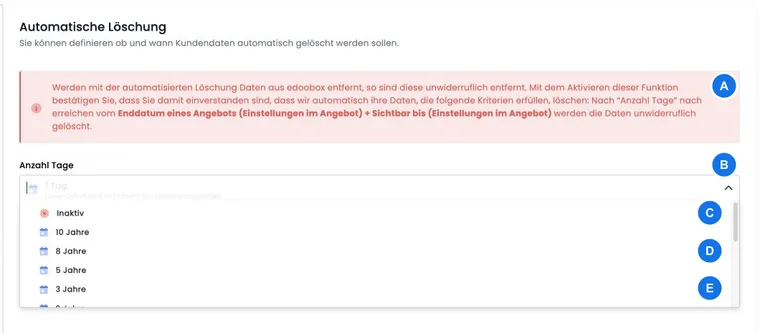
The V2 selector includes Inactive and periods starting at one week. You can currently save a deletion period of one week (7 days), two weeks (14 days), one month (30 days), one quarter (90 days), half a year (180 days), one year (360 days) or two years (720 days). The month and year labels here represent fixed numbers of days.
The previous option 1 Day is disabled and no longer offered.
The designation “2 Years” corresponds to 720 days here, not two calendar years. When saving regularly in V2, larger values are limited to 720 days. Existing higher old values may still be used by the deletion run; saving again may shorten this longer period. Therefore, change an existing long period only after the effects on existing data have been clarified.
Activate or stop automatic deletion
Open Settings and Automatic Deletion.
Select a valid period between one week and two years.
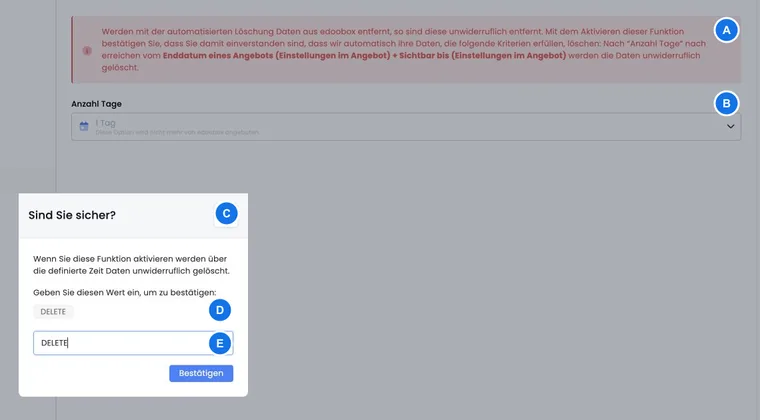
Read the warning and enter exactly
DELETEin the confirmation dialog.Reload the page and verify the saved value.
Document the decision, date, responsible person, and external archive.
To stop future runs, select Inactive. No new DELETE confirmation is required for this.
Newer bookings protect a profile
edoobox checks more than just the offer currently due for deletion. If a person has another booking for an offer with a later visible-until date that has not yet passed, the profile is protected from deletion for the time being.
For group bookings, linked people and bookings are considered together. If part of the group booking cannot yet be deleted, linked data is retained as well. This can cause an old offer to remain longer than the calculated period.
This protection is not a legal archive. As soon as the most recent relevant booking is also outside the period, the next run can remove the data.
Which data may be affected
Participant profiles: Account-related profiles are removed if no newer booking blocks them. A global profile is deleted if it is no longer required in any other edoobox account.
Bookings: Due bookings and dependent participations, payments, notes, or files may be deleted along with them.
Offers: A due offer is removed as soon as no protected booking or person holds it back. Afterwards, the offer tree is rebuilt.
Email history: When a deletion run removes profiles, edoobox also deletes emails in the account that are older than the selected period. This leaves the historical outbox incomplete.
Promotion codes: Single-use codes associated with deleted bookings are deactivated.
Statistics: Evaluations for deleted time periods lose their data basis.
Protect invoices, payments, and external systems
Removing profiles and bookings may also remove or make inaccessible associated transaction chains, invoice references, and generated PDFs. Outstanding amounts are not a general protection against automatic deletion.
Before the cutoff date, archive at least invoices, cancellation invoices, payment evidence, transaction exports, and the master data needed by your accounting team. See Tables and exports, Invoices, and Participant transactions.
A payment provider may continue to store data outside of edoobox. However, after deletion, internal assignments for later status reports, refunds, or investigations may be missing. Close ongoing online payments and Bank reconciliations before the expected deletion date.
Also include the required booking evidence: stored legal text version, attached cancellation terms, cancellation request, fee decision, and refund. The currently published text version does not fully reconstruct a previous booking. Clarify the required scope before the deletion run and use the end-to-end review process to detect missing assignments early.
Checklist before activation
Clarify statutory and contractual retention periods with the relevant specialist department.
Consider the retention period for participant data separately from financial data and accounting documents.
Check a complete export with a sample for readability and retrievability.
Clear open invoices, payments, refunds, and dunning runs.
Inform integrations, webhooks, Zapier Zaps, and external accounting about the reduced data availability.
Designate a responsible person and a regular review date.
Use cases
Use case: Retain operational course data for two years
An organization keeps an auditable archive of invoices and payment evidence outside edoobox. For operational profiles and offers, it selects two years, confirms with DELETE, and reloads the page. Every quarter, it checks exports, pending outbox messages, and the saved period.
Use case: A newer booking postpones the deletion
A profile belongs to an old course whose period has expired and to a new course next month. The newer booking initially blocks the deletion of the profile and the linked old booking. Only when the later visible-until date plus period has also expired can the next run delete it.
Use case: Ten-year accounting document retention requirement
An accounting department must retain documents for ten years. Because the current server-side period is limited to 720 days, automatic deletion remains inactive. Invoices and payment data are kept in a verified archive; a separate organizational policy minimizes participant data that is no longer needed.