
Understand languages in edoobox
edoobox uses languages in several places. Distinguish the admin interface language, booking-process languages and your organisation's correspondence language.
This guide explains how language settings affect the admin and participant interfaces, email templates, Design Manager content and table filters, so you can keep them consistent.
Admin language
The admin language controls the management interface for admins. The current interface offers German, English and French. This language applies to menus, tables, dialogs and system texts in administration.
The admin language is not automatically identical to the language in which an offer appears publicly. An admin may use the interface in French while the customer booking process is available in German, English and Italian.
Booking-process languages
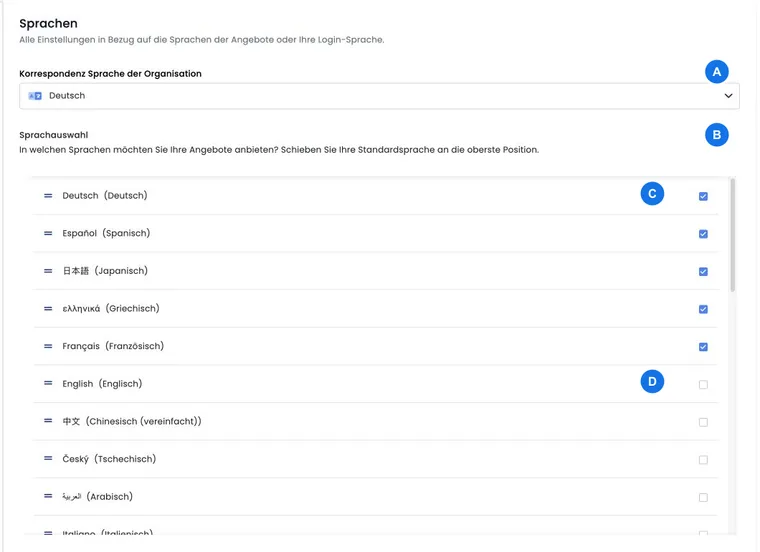
Booking-process languages control participant-facing content: offer and category descriptions, Design Manager texts, email templates, labels, price and session texts and other multilingual fields.
Depending on the account and settings, many more languages may be available than for administration, such as German, English, French, Italian, Spanish, Dutch, Portuguese, Turkish, Polish, Swedish, Danish, Greek, Japanese or others. What matters is which languages are active in your account and which texts have actually been maintained.
Active languages and fallbacks
Active languages define which language versions are offered in booking and expected in multilingual input fields. Their order matters: the first active language serves as the default in many areas. If text is missing in an active language, edoobox may fall back to a default language or neutral fallback depending on the area.
Do not rely permanently on fallbacks. Preview all active languages before publication, particularly descriptions, email templates, additional questions, additional services and Design Manager widgets. Inactive languages may remain visible in lists but cannot be sorted like active languages or used fully in booking.
Organisation correspondence language
Correspondence language affects administrative communication and default outputs not directly based on an individual booking's language. It is therefore particularly important for email templates, invoice texts and standard messages.
For a multilingual team, define internally the default language and content to maintain per language. This prevents customers receiving mixed-language texts.
Languages in tables and filters
In tables, filters and selection fields, edoobox displays language codes as understandable names. Admins can filter by language, check language versions or more quickly identify available content in lists.
Exports or interfaces may still show technical codes such as de, en, fr or it. Use them consistently when importing, exporting or processing data through the API. Table filters usually convert such codes into readable language options so admins need not work with abbreviations.
Design Manager, texts and templates
In the Design Manager and descriptions, edit content per language. Widgets can have their own labels; email and PDF templates can also be maintained per language.
If an offer is bookable in several languages, test the form, confirmation page, email and PDF as well as the offer page. Missing translations often emerge only at the end of booking. Therefore first activate a new language, maintain texts and templates completely, and only then change the order if that language should truly become default.
Distinction from translation and AI
Language settings do not translate content automatically. They control available language versions and the language displayed. You can use AI assistants to optimise or translate text, but the result must be checked for accuracy and saved.
For public booking, also read Language settings: offer the booking process in multiple languages.
Example: offer German and French
An organisation activates German and French for booking. Admins continue working in German. Before publication, descriptions, form texts, email templates and Rechnung.pdf are checked in both languages. Correspondence language remains German for internal standard communication.
Check booking-process and organisation languages
- Open Settings → Languages and check active languages and their order.
- Activate an additionally required language, then maintain multilingual offer, form, email and PDF content.
- Open Settings → Organisation and check correspondence language separately.
- Start the public preview in each active language and check offers, forms, completion and sent documents.
Administration has its own language selector offering German, English and French. Changing the admin language neither activates a new public language nor translates custom content.