
Use MustPay and Countdown safely
MustPay and Countdown serve different purposes. MustPay makes successful payment a prerequisite for a confirmed booking. Countdown limits how long the places or dates selected during booking remain reserved.
You can use either function individually or combine them. The right choice depends on capacity, payment methods, target audience and the time people realistically need for the form and payment.
What are the benefits of MustPay?
MustPay lets you distinguish public registrations from confirmed participations while the required payment is still outstanding. This is useful when a place should be confirmed only after advance payment. Your team can identify incomplete payment processes as a separate booking status and organise follow-up work accordingly.
The limits concern payment and capacity: MustPay does not guarantee a place indefinitely. Countdown also limits the reservation during booking. Decide on the payment method, time allowance and confirmation wording together. The expandable notes below help with this decision and special cases.
MustPay and Countdown at a glance
Feature | Without the function | With the function |
|---|---|---|
MustPay | The booking becomes active immediately; an outstanding amount remains as a balance. | The booking remains in MustPay status until payment succeeds. |
Countdown | There is no visible completion deadline selected by you. | The reservation expires after the selected duration and the booking process ends. |
Activate MustPay and understand its effect
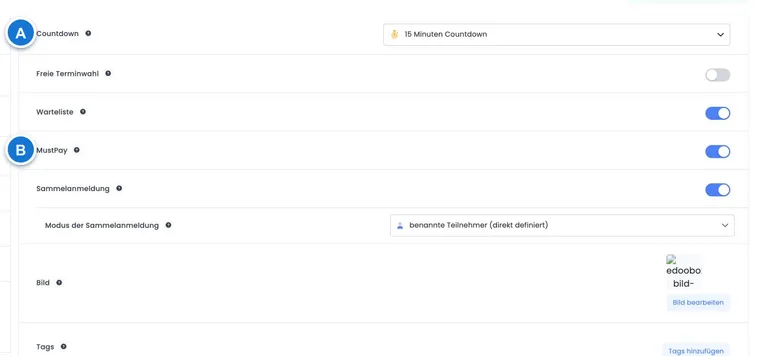
Open the offer’s Settings and activate MustPay. The function applies to public bookings. Bookings created administratively or through the API do not pass through the public payment requirement; check their balance yourself.
After completing the booking, the person is always taken to the payment page. The booking is saved with Waiting list and MustPay and does not yet count as a confirmed participation. Only a successfully recorded payment triggers admission, provided the required capacity is available.
If no uncovered booking charges remain, edoobox automatically removes MustPay and activates the booking without an additional payment step. This can happen with a free price category, a voucher covering the full amount or correctly applied available credit. The remaining outstanding amount in the actual booking is decisive.
Select a countdown
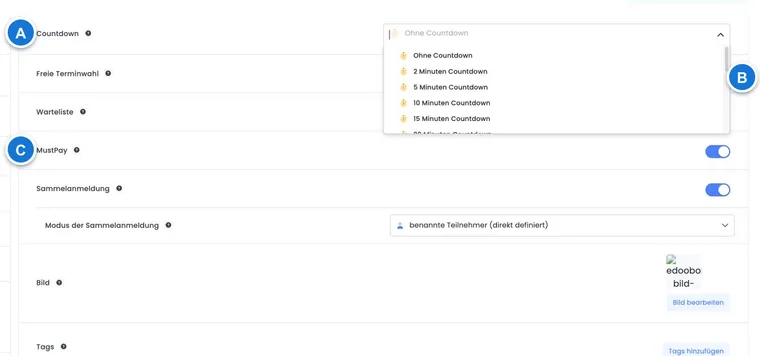
Select the countdown in the offer settings. The available options are no countdown, 2, 5, 10, 15, 20, 30 or 60 minutes, 2 or 12 hours, and 1 to 7 days in whole days.
Countdown starts when the booking process begins and continues on the payment page. Do not choose a deadline shorter than your audience needs for participant details, additional questions, payment authorisation and any two-factor confirmation.
From booking to confirmation
The person starts the public booking; an active countdown begins immediately.
Price categories and, where applicable, dates are reserved for the current booking.
After completion, a provisional MustPay booking is created and the payment page opens.
When payment succeeds, edoobox checks capacity and converts the booking into an active participation.
The final booking confirmation and, depending on the settings, an invoice, ticket or other attachments are then generated.
Automatic MustPay payment reminder
A periodic process checks an outstanding MustPay booking approximately ten minutes after registration. If it is unpaid, Countdown is still valid or is not activated, and no Stripe SEPA payment is in progress, edoobox places the MustPay complete registration email template in the outbox once.
The reminder contains the amount, payment link and, if configured, the invoice. Paid bookings and SEPA direct debits in progress receive no reminder. The process considers only new MustPay bookings from the last day and marks the entry as processed after checking it; do not plan a repeated series of reminders through this template.
Edit the template under Edit email templates in edoobox and check delivery and errors in the outbox.
What happens when Countdown expires
If Countdown expires during a normal MustPay booking and payment is still outstanding, the background process removes MustPay status. The booking remains on the waiting list. A later payment no longer activates it automatically; the history records this as MustPay countdown expired.
Check payment, available places and the booking together. If a place is available, you can deliberately confirm the person and then send the booking confirmation. If no place is available, arrange a refund or alternative offer before communicating.
MustPay with free date selection
edoobox V2 now supports MustPay combined with Free date selection. The selected dates initially remain reservations until payment. When payment arrives, edoobox checks each date again and creates confirmed date bookings only if enough places are available.
If a date reservation has expired and the date is now full, that date is removed from the booking. edoobox creates the internal task MustPay date booking incomplete listing the affected dates. With this combination, also check Tasks and pending tasks.
Combine MustPay and the traditional waiting list
Both switches can be active at once, but represent different states. While capacity is available, a public booking starts as MustPay and becomes active only after payment. For an offer that is already full, MustPay may block the start of public booking even if the waiting list is enabled.
To collect people who can take places that become available, use the traditional waiting list without MustPay. You can organise payment and final confirmation when admitting them later. A personal link from a waiting list request does not bypass MustPay: if MustPay is active in the target offer and an amount is outstanding, this completion also leads to the payment page.
Choose suitable payment methods
Immediately confirmed online payments: credit cards through Stripe, PayPal Checkout or Worldline / Saferpay are best suited to short countdowns.
Invoice and bank transfer: payment arrives later. Preferably use MustPay without a short countdown and check whether capacity is still available when payment arrives.
Stripe SEPA Direct Debit: an initiated direct debit may remain pending for a long time. edoobox suppresses the MustPay reminder while a SEPA payment is in progress. Test the entire process before using it in production.
You can find an overview of the options under Payment systems for participant payments.
Confirmations and internal information
While MustPay remains outstanding, the person booking receives no final booking confirmation. After successful activation, edoobox sends the normal confirmation and generates the configured attachments. For critical offers, also check the invoice, ticket, calendar file and outbox.
In the internal registration information email, ##BookingInfoType## can distinguish the state. In a German account, typical values are Standard, Warteliste, Anfrage-Liste and MustPay. This lets you write clear internal subject lines or notices.
Abandoned payment: why a place is still reserved
Closing a browser window or abandoning payment with the payment provider does not immediately release previously reserved places. edoobox distinguishes between an ongoing place reservation, an already saved MustPay booking with an outstanding amount and a paid active participation. Therefore, fewer free places may be displayed than the confirmed participations in the list would suggest. A particular price category’s allocation may also be temporarily occupied.
- Open the offer and compare confirmed participations, MustPay/waiting list entries and the affected price category. With free date selection, also check the individual date.
- Open an already saved booking and check the transaction, outstanding amount and history. A browser error does not prove that the provider received no payment.
- Check the configured countdown. Without a visible countdown, a normal start initially uses a technical reservation of 15 minutes; its expiry does not cancel an already saved booking. With a configured countdown, the selected completion deadline applies.
- Let an ongoing reservation expire and reopen public availability. Repeated new test bookings can create more reservations. If a discrepancy remains, check other ongoing processes and the date/price capacity.
- If you deliberately decide not to continue a saved booking, check payment and credit, then handle it through the cancellation process. Countdown expiry can retain the booking as a waiting list entry. It does not replace the necessary administrative cleanup.
Example: a person starts card payment for the last workshop place and closes the window. The team creates no additional test registration and first checks the existing MustPay booking and payment. After the reservation expires, availability is reloaded. If money arrives later, available places and the expired countdown are checked before manual confirmation.
Check typical situations
Situation | Check | Next step |
|---|---|---|
Payment successful, booking still MustPay | Check capacity, transaction assignment, countdown and dates. | Confirm manually only if a place is available; otherwise offer a refund or alternative. |
Countdown expired | Check waiting list status, payment time and the history note. | Do not treat a late payment as an automatic place guarantee. |
Free date selection incomplete | Open the MustPay date booking incomplete task and the booked dates. | Assign a replacement date or clarify the difference with the person. |
No reminder email | Check whether payment is already complete, SEPA is in progress, Countdown has expired, the booking’s age and the outbox. | Send the payment link personally if needed. |
Use cases
Example: twelve workshop places only with immediate payment
A workshop is in high demand. MustPay and a 15-minute countdown are active; credit cards and PayPal Checkout are offered. Bookings not completed in time do not block places permanently. The team checks MustPay and waiting list statuses and failed payments daily.
Example: corporate course with invoice and longer payment period
Companies may pay by invoice. The organisation activates MustPay, omits a short countdown and reserves sufficient capacity. When payment arrives, it checks whether the booking was activated. If not, it decides based on available places and informs the contact person personally.
Example: MustPay with three freely selected dates
A person selects three dates and pays shortly before expiry. Two dates are still available; one reservation has already expired and that date is now full. edoobox activates the booking with the available dates and creates a pending task for the missing date. The administration offers a replacement.
Understand subscription prices and saved payment methods
If a participant subscription determines access to a price, also check this entitlement in the price category. A zero booking total can become active without payment; the permitted subscription use must still match the participation.
MustPay describes the course booking’s state until the required payment. Configure automatic use of a saved credit card or recurring subscription payments through the relevant payment and subscription process. A saved card alone does not prove that a MustPay booking has been paid. Always open the actual transaction status when investigating a question.