
Use promotional campaigns strategically
Promotion campaigns control discounts and voucher codes in the edoobox booking process. They define not only a value but also the period, eligible offers, booking type, currency, minimum booking value, permitted email addresses or domains, and positive and negative customer tags.
The Promotions area contains two separate views: Promotions for discount campaigns you plan yourself and Vouchers for codes paid for through voucher sales. Both use the same redemption logic but are created differently.
Define the business goal first
Goal | Suitable implementation | Main restriction |
|---|---|---|
Public discount campaign | One shared percentage or fixed-amount code | Short period, narrow scope and maximum uses per code |
Partner or platform campaign | Generate or import many unique codes | Single use, secure handover and export checks |
Member or company discount | Code with positive and negative tags or a permitted domain | Login for checking tags, or the main participant’s email address for checking the domain |
Sell a gift voucher | Voucher sales button in the Design Manager | Payment, single redemption, validity and accounting |
Distinguish a discount from a monetary voucher
Offer price reduction: reduces the price categories. It can be defined as an amount or percentage. Additional services are not automatically discounted too.
Application to the booking total: is possible only as an amount and is credited like a partial payment against the appropriate booking total. This variant suits sold or external monetary codes.
A percentage cannot be combined with application to the booking total. If you select a percentage, edoobox switches the application method to offer price. Create a promotion campaign explains all fields.
Control target groups with domains and tags
A permitted full email address or domain is checked against the main participant’s email address in the current booking. In collective bookings, this is not automatically the address of every registered person.
Tag conditions work differently: the person must be logged in to edoobox. Positive conditions are mandatory and must all match; just one matching negative condition blocks redemption. The effective tag set includes direct participant tags, tags from bookings outside the waiting list and tags from a SAML assignment. An offer’s end date passing does not currently remove a tag originating from it automatically.
Provide code entry during booking
A campaign alone does not display an input field. Enable Display promotions during booking in the general offer settings and place the promotion code widget in the booking template used in the Design Manager.
A booking can hold one promotion code. Entering another code replaces the previous assignment. Therefore, do not test combinations as stackable discounts.
Monitor and end campaigns
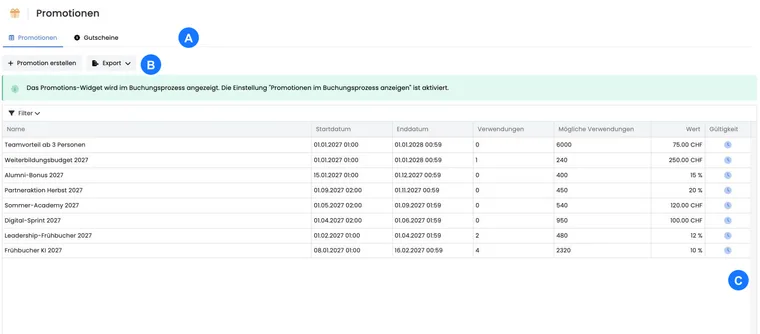
The table shows the start, end, value, previous uses, theoretically possible uses and time-based state. Filters separate ongoing, scheduled and expired promotions. The details view shows the scope, booking type, minimum value, domains, tags and codes.
Promotions cannot be deleted in the current V2 API. End a campaign using its end date and disable compromised codes individually. An existing code cannot be renamed or deleted, preserving traceability of its use.
Use cases
Example: A public early-bird discount
An academy publishes FRUEH20 for the Summer courses category. The code reduces the offer price by 20 percent, is valid only until the end of May and can be used at most 80 times. Before sending the newsletter, the team tests a normal booking, an additional service and an invoice.
Example: A member campaign with positive and negative tags
Only logged-in profiles with Mitglied: aktiv may book; Rabatt-Sperre excludes the person. Since tags from earlier offers outside the waiting list can also count, the organisation also tests a former member and cleans up unintended historical tag effects.
Example: Single-use codes for a corporate partner
For beispiel-firma.ch, 100 unique codes are created, each redeemable once and only for normal bookings. The main participant’s email domain must match. The partner receives a protected export; unused codes are disabled after the campaign.
Define remaining-value handling for monetary codes
For Settlement with booking total and a fixed amount, select under Remaining value of a promo code what happens with an unused amount: Remaining value expires, credit the full promo code value to the user account, or create a new promo code for the remaining value. This selection is not intended for pure offer price discounts and percentage discounts.
Example: A CHF 100 voucher code is used for a CHF 80 booking. Depending on the setting, the remaining CHF 20 expires, remains as a positive participant balance or is issued as a new code. In user account mode, the full code value is credited and the current booking is paid from that credit. The original code still follows its usage limit.
The complete setup, invoice check, and email check is explained in Vouchers: Remaining values and credits.
Combine promotions with memberships and passes
A promotion code and a membership or pass benefit are not simply added for the same person and price position. edoobox compares the applicable monetary benefits and uses the larger one. In case of equal positive benefit, the promotion wins. A limited pass usage can be preserved thereby, provided the pass is not simultaneously used as an access requirement.
Example: The offer costs CHF 100. A member price gives a CHF 20 benefit, while the promotion gives CHF 10. The applicable CHF 20 benefit is deducted, rather than a combined CHF 30. For group bookings, check each person; for additional services, check the calculation basis. Different currencies are not converted for this comparison.
A redemption code for a membership or pass may appear in the same input field, but is not a freely configurable voucher. The setup and usage is explained in Passes and redemption codes.
Check the conditions of a remaining value separately
Participant credit and a new code for the remaining value inherit the original code’s restrictions differently. Credit becomes a separate balance without the original offer restriction or expiry. A new code receives its own promotion with a minimum booking value of 0; customer tag conditions are not copied automatically. For restricted campaigns, check the restrictions actually created. For the complete process, see Vouchers: remaining values and credit.