
Bookings with Double Opt-In
The illustrations show an earlier version of the interface. Use the steps in this guide for the available features and options.
Double opt-in checks the email address or telephone number during booking before a booking is completed. The feature helps reduce incorrect contact details, fake bookings and unwanted registrations.
The code check described here confirms a contact detail in the booking form. Set up newsletter registration separately using the designated process in your newsletter system.
What does double opt-in mean?
Double opt-in means that a person additionally confirms the information they provided. For email, they receive a code or confirmation link, for example. For telephone, a code is sent by SMS or read out.
In the intended verification process, the person confirms the code received. Technical exceptions apply to telephone verification; see the section on delivery problems.
Available options
Email verification: The person making the booking confirms their email address.
Telephone verification: The telephone number is checked by SMS or voice call.
Combination: Both email and telephone number are checked.
SMS or telephone checks may incur costs. Check the notices displayed in the editor and the available balance in your edoobox account.
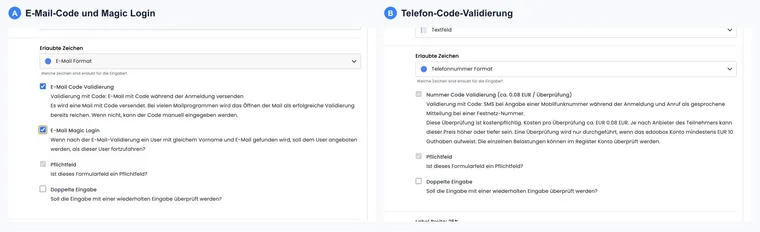
Enable email verification
In the Design Manager, open the required participant form.
Open the email field settings.
Select the email format.
Enable email code validation.
During booking, edoobox sends a code to the email address entered. In some email clients, simply opening the message may be sufficient for successful validation; otherwise, the person enters the code manually. If the code is not recognized correctly, the booking cannot be completed.
Enable telephone verification
In the participant form, open the telephone number field settings.
Select the telephone number format.
The associated number code validation is permanently enabled with this format and greyed out in the editor.
edoobox sends a code by SMS. If the device cannot receive SMS messages, the code can be read out. An incorrect code does not confirm the telephone number. If the delivery service fails, edoobox may suspend telephone verification for that process; therefore, also check this exception.
Check the telephone number and country calling code
The telephone number entered is converted to E.164 format. If this is not possible, the number is invalid. For local numbers, edoobox uses the country calling code from the registration; if this is not recognized, the country from the system settings is used.
Telephone verification incurs a charge. Before enabling it, check the costs displayed in the editor and the available balance in your edoobox account. The actual price may vary by provider and country. Review individual charges in the account or account journal and ensure that sufficient credit is available.
Double opt-in and newsletters
If newsletter consent is requested during booking, it must be properly documented. Use double opt-in as additional confirmation, rather than as a substitute for clear consent wording.
For newsletter integrations, read Automatic export of participant data to a newsletter system.
Consent to terms and conditions or another legal text is also configured separately. A verified email address does not confirm a particular text version. Use Legal texts in the booking process and their evidence. Tracking consent in the cookie banner is yet another separate setting.
When double opt-in is useful
Use double opt-in selectively: it protects against incorrect data and fake bookings, but makes booking longer. A confirmed address is particularly important for newsletter consent. For normal course bookings, decide whether email, telephone or both are necessary based on risk, target audience and support effort.
If you enable telephone validation, briefly explain in the form that an SMS code or voice call may follow. Participants are then less likely to abandon booking when they unexpectedly receive a code.
Costs, abandonment and user experience
Double opt-in improves security but makes booking slightly longer. Briefly explain in the form why a code is sent and what participants should do if it does not arrive.
Practical example: Secure newsletter consent
A provider requests newsletter consent in the booking form. They enable email code validation for booking and configure newsletter consent through the designated process in their newsletter system. A confirmed booking email address alone is not newsletter consent.
With the Telephone number format, the associated number code validation is permanently enabled in the editor and therefore greyed out. It is not enabled by an additional optional switch. Enter a number with an appropriate country calling code and test an accessible SMS or telephone connection.
An incorrect confirmation does not count as successful verification. However, if the delivery service is unavailable, edoobox may suspend telephone verification for that process and allow booking to continue. Do not use this feature as the sole evidence of an entitlement to access. Email code verification and Magic Login must be configured separately.
In your own workflow, test successful verification, an incorrect code, requesting another code and abandonment. The verification costs shown in the editor and delivery service availability govern your setup; they do not imply a blanket guarantee for every country and connection combination.
Code checks when verification fails
First ask the person to check their email address or telephone number and country calling code. A code applies to the input currently being verified. An incorrect code produces an error; after repeated failed attempts, the existing code can no longer be used. Request new verification through the designated process. For email, also check the spam folder and delivery.
Telephone verification is not a guaranteed access restriction: if the verification service cannot technically send the code, the current workflow allows booking to continue without successful telephone verification. When email verification is active, it may also be confirmed through the designated verification image in the opened message. Therefore, document failed verification using the actual form state rather than assuming an identity is confirmed merely because a message was sent.