
Payments, invoices, and dunning
This overview guides you through participant payment instructions: from payment method setup through invoicing and incoming payments to corrections and payment reminders.
Billing for your own edoobox subscription is provided under Account: Billing and account journal.
Set up payment methods
The payment systems overview leads to individual payment providers. Payment systems for participant payments covers setup for your bookings. For bank transfers, use Invoice for offline payment and bank transfer.
Edit invoices and documents
Check incoming payments and transactions
For bank imports, start with the CAMT guide. Already imported entries still pending have a separate assignment guide. Manual transactions are described separately.
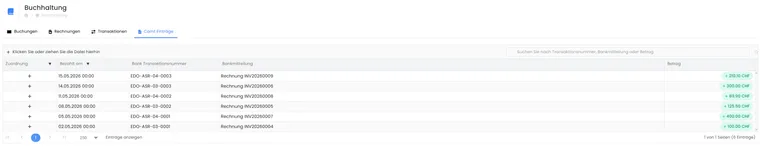
In accounting reconciliation, you see imported CAMT entries. Use search and the bank message to check which invoice an incoming payment belongs to.
Clarify cancellation and refund
Choose the guide for the affected part of the process: Cancel or rebook a booking, Edit an invoice or cancellation invoice or Check refunds and transaction fees. Cancellation conditions are configured separately.
Follow up outstanding payments
The guide Check and follow up outstanding payments combines invoice, booking and incoming payment review. For subsequent sending, read Send a payment reminder and check the message in the outbox.
Transfer data to accounting
New subpages for billing and payments
- Automatically apply positive participant balances: use participant credit for new bookings.
- Electronic invoices with ZUGFeRD and XRechnung: configure current profiles and output files.
- Export transaction fees as CSV: export monthly edoobox fees for supported payments.
- Automatic payment with a saved credit card: settle edoobox account costs with default and backup cards.
- Participant subscriptions: Renewal and cancellation: check the receivable and invoice for a new participant subscription period.
- Set up Bexio integration: define invoicing and synchronisation with Bexio.
Automatic dunning is announced as Coming soon. If you are interested, contact support; individual activations may already be possible. Check whether the feature is enabled and active for your account. Manual payment reminders remain a separate process.