
Automatic QR references for invoices: SCOR and QRR
SCOR and QRR determine how a QR invoice encodes the payment reference. A clean reference allows your bank and accounting software to uniquely assign a payment receipt to an invoice. It does not replace the CAMT import but makes its assignment more reliable.
Select SCOR or QRR
| Type | Technical behavior | Configuration |
|---|---|---|
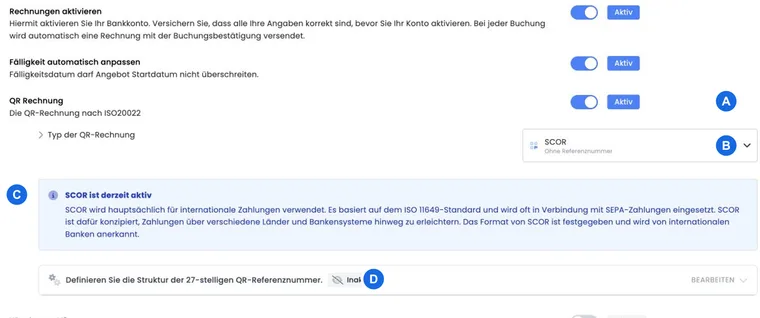
| SCOR | edoobox generates an ISO-11649 Creditor Reference with an RF check digit from the invoice reference. | The 27-digit QRR structure is inactive. |
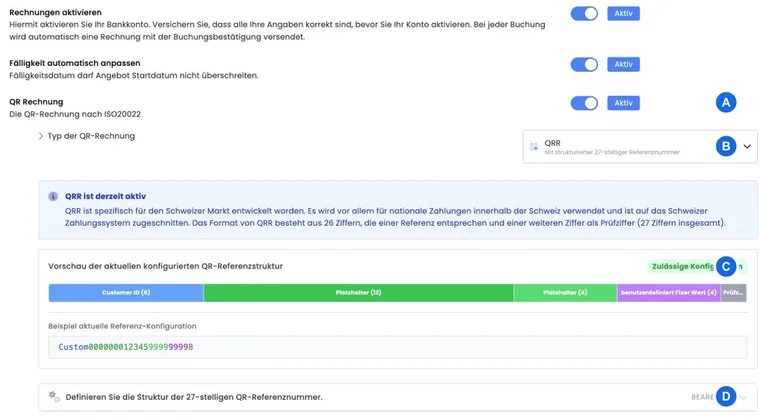
| QRR | edoobox generates a Swiss QR reference with a total of 27 digits. | The structure must comprise exactly 27 characters and include a section for InvoiceNumber. |
The type selection is saved immediately in the current V2. If you have made unsaved QRR structure changes and then switch the type, the editor resets this structure to the last saved state.
IBAN and reference belong together: For QRR, you need a QR-IBAN; for SCOR, a regular IBAN. Do not use the same account value unchecked for both variants. Agree on the account type, currency, and reference with your bank and scan an issued invoice. The current specifications are published by SIX for the QR invoice.
Understand the QRR standard structure
The V2 editor starts with four consecutive sections:
| Position | Standard content | Editable |
|---|---|---|
| 1 to 6 | Reserved block Customer ID | Position and length are locked; value according to bank specification. |
| 7 to 18 | Placeholder InvoiceNumber | Yes, as long as the overall structure remains valid. |
| 19 to 26 | Fixed value, padded with zeros by default | Yes. |
| 27 | Check digit | No; edoobox calculates it using the Swiss Modulo-10 method. |
For the first block, the server-side generation uses the customer identification you receive from your bank. In PostFinance, this value may remain empty according to the technical implementation. Clarify the specific requirement with your bank before production dispatch.
Edit QRR structure
Enable the QR invoice in the invoice settings and select QRR.
Open QRR Structure Configuration.
Keep the first block at positions 1 to 6 and the check digit at position 27.
Add fixed values or placeholders from the Rechnung.pdf in between.
Ensure that at least one section uses InvoiceNumber.
Check the preview and save only when there are exactly 27 characters.
The editor arranges the sections consecutively without gaps. A fixed value must not be longer than its section. The API normalizes fixed values and dynamic reference values numerically and pads them with zeros on the left.
Plan invoice number and alias correctly
The general invoice setting allows an alias of up to five characters and a next invoice number of up to ten digits. For QRR, the dynamic value is processed server-side as a number. Letters and separators from a display alias are therefore not reliable components of the 27-digit reference.
Test the number range first: Plan the QRR structure with the largest expected invoice number. Check not only the visible invoice but also the actually generated 27-digit reference and the CAMT reconciliation.
When saving is blocked
For QRR, the V2 interface prevents saving if the total length is not 27 or there is no InvoiceNumber section. Server-side processing also checks minimum lengths, consecutive sections, the locked first block, the space reserved for the check digit, and excessively long fixed values.
For SCOR, the QRR structure is not relevant for the active reference. An erroneous QRR draft configuration therefore does not block the switch or saving of SCOR.
Test the reference completely
Generate a new invoice after each change; existing PDFs do not automatically show the new reference.
For QRR, count all 27 digits and check whether the invoice number is recognizable in the intended section.
Scan the QR code and compare the amount, account, and reference with the invoice.
Import a suitable CAMT test dataset and check the assignment to the open invoice.
Test the transition to the next digit length, for example from 99999 to 100000.
Application example: QRR with the standard structure
The bank confirms customer identification for positions 1 to 6. The organization keeps InvoiceNumber on 7 to 18 and the zero block on 19 to 26. After saving, it generates an invoice, checks 27 digits, and imports the associated CAMT test entry.
Application example: Internal fixed value before the invoice number
The accounting department requires a two-digit numeric invoice series. The team shortens other editable blocks so that Customer ID, fixed value, InvoiceNumber, and check digit still result in exactly 27 digits. An invoice at the upper end of the planned number range serves as a load test.
Application example: Switching from QRR to SCOR
After consulting with the bank, SCOR is to be used going forward. The team first saves the current QRR status, then switches to SCOR and creates a new invoice. It checks the RF reference and adjusts the CAMT allocation process without retroactively reinterpreting old QRR invoices.
Distinguish between preview and actually issued reference
The colored preview in the QRR editor uses sample data. It confirms the structure but does not replace an issued test invoice with your actual invoice number. After saving, check the reference in the new PDF and when scanning. A later change of the reference type does not invalidate already sent invoices; continue to allocate their incoming payments according to the original reference.
In case of an error message, correct the relevant structure before creating the invoice again. A CAMT upload with the same faulty reference does not repair the reference configuration.