
Overview of all email templates
Look up directly: Find templates by process and search term. The reference also includes subscription, overdue notice, ticket and custom template contexts.
edoobox V2 groups system templates by recipient and process. Some entries are composite templates: a booking confirmation, for example, comprises email, Booking.pdf, Ticket.pdf and ICS file. Each component may have its own content, placeholders and activation rules.
Therefore never edit only visible email text. Check trigger, booking status, language, active sending provider and all enabled attachments together.
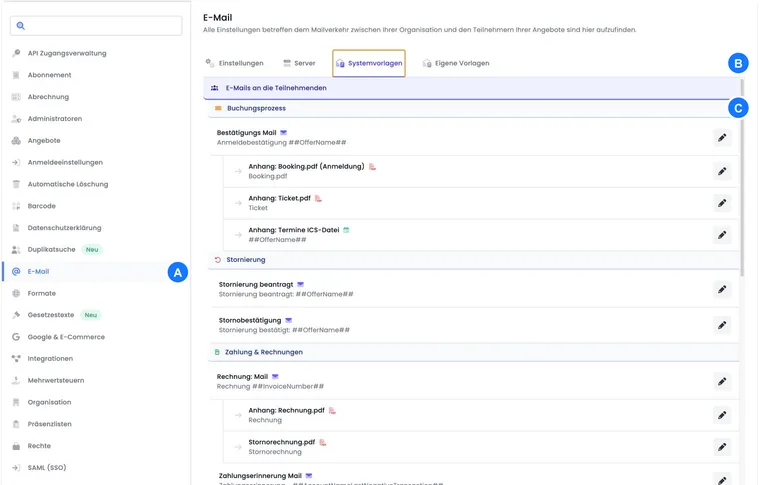
Participant booking process
| Template tree entry | Component and purpose | When to check |
|---|---|---|
| Booking confirmation | Confirmation email: Message for a definitive booking. | Online and admin booking, rebooking, manual resending. |
| Attachment: Booking.pdf Registration: Booking summary. | Only if Booking.pdf should be sent globally. | |
| Attachment: Ticket.pdf: QR/barcode ticket. | Ticketing active, no waiting list booking. | |
| Attachment: Dates ICS file: Calendar dates. | ICS active, dates present, no waiting list booking. |
For manual sending, current status still determines whether normal confirmation or waiting list template is used. Details are provided under Send booking confirmation manually.
Cancellation
Cancellation requested: Confirms receipt of a cancellation request before an admin decides.
Cancellation confirmation: Confirms actual cancellation and may contain fee, refund and invoice information.
These templates do not replace substantive checking of booking, fee, refund or cancellation invoice. Check the overall process under Cancellation and withdrawal.
Payment and invoices
| Template | Typical trigger |
|---|---|
| Payment reminder email | Manual sending from booking details through Email → Send payment reminder. |
| Rechnung.pdf | Creation of an invoice. |
| Invoice email | Sending an invoice. |
Overdue payment management has dedicated payment reminder and overdue notice templates with Dunning placeholders. Check the menu to see whether you are editing the classic manual payment reminder or an overdue notice level.
Reminders, attendance and certificates
Reminder email: Message before the date, automatic according to the configured time rule or manual from booking.
Attendance confirmation email: Message after attendance checking.
Attachment: Zertifikat.pdf: Certificate with attendance, validation data and optional instructor signature.
Non-attendance notification email: Alternative for people who fail to reach required attendance.
Date end, attendance status, minimum attendance and sending delay must align. See Attendance, attendance confirmation and certificates.
Waiting list, MustPay and request list
| Entry | Purpose |
|---|---|
| Waiting list enquiry email | Offer selected waiting list people a booking route for an available place. |
| Waiting list: Booking confirmation email | Comprises Waiting list confirmation email and Booking.pdf Waiting list; contains no normal ticket or normal ICS file. |
| Complete MustPay registration | Continue or discard a started registration not yet fully paid. |
| Enquiry list: Enquiry email | Comprises Enquiry list email and Booking.pdf Enquiry list; contains decision link and validity. |
| Enquiry list reminder email | Reminds people of a pending decision. |
| Enquiry list rejection email | Informs of rejection in the intended process. |
| Decision deadline expired | Informs that the valid decision deadline has passed. |
| Admin rejected the enquiry | Dedicated message for an enquiry rejected by an admin. |
Go-ahead, cancellation and other system messages
Go-ahead email: Informs booked people that an offer will take place.
Cancellation email: Informs of cancellation; booking cancellation and money movements must be prepared separately.
Voucher sales: Contains code, name, value and expiry of the purchased voucher.
Forgot password: Contains the password change link.
Admin invitation: Invites a new admin. It substantively belongs to admin access although it appears in the template tree’s participant section.
Emails to the organisation
Registration info: Internal information about a new participant booking.
Information notice: Internal message when minimum or maximum values are reached.
Participant cancellation: Internal information about cancellation or a corresponding process.
These messages do not automatically go to the same person as booking confirmation. Check stored organisation addresses in Email settings.
Check templates using a small case matrix
| Test case | Check at least |
|---|---|
| Definitive booking | Confirmation email, language, Booking.pdf, ticket, ICS, outbox. |
| Waiting list | Waiting list template, watermark, no ticket/ICS, later place allocation. |
| Invoices and payments | Invoice email, Rechnung.pdf, payment link, payment confirmation, outstanding balance. |
| Cancellation | Request or direct cancellation, fee, refund, cancellation confirmation, cancellation invoice. |
| Attendance | Sufficient and insufficient attendance, certificate and non-attendance notification. |
| Enquiry list | Initial email, Booking.pdf, second address, reminder, acceptance, rejection and deadline expiry. |
Example: Completely test a paid booking
A test person books on invoice. Confirmation email, Booking.pdf, ticket, ICS, invoice email, Rechnung.pdf and outbox are checked. After partial payment, payment confirmation and invoice balance are checked; a cancellation test follows.
Example: From waiting list to an available place
A test person joins the waiting list and receives only waiting list confirmation. After a place enquiry, booking is completed. Normal confirmation and attachments enabled for it may appear only in definitive status.
Example: Certificate after an attendance decision
Two test people receive different attendance values. Only the person above minimum attendance receives attendance confirmation and certificate; the second gets non-attendance notification. Both outputs are checked in every active language.
Design payment reminders and overdue notice levels
Under Payment & Invoices → Overdue payment management, Payment reminder, Overdue notice and Postal overdue notice (PDF) are available. The respective overdue notice process populates these templates with Dunning… placeholders. Content and a saved template alone do not start an overdue notice run. Check rule, level, outstanding amounts, fees and sending method under Overdue payment management: Open processes and overdue notice runs.
Subscriptions and passes: Renewal reminder
The Subscriptions and passes template group contains the subscription renewal reminder. It informs the affected person about the next period and can contain payment, invoice and cancellation links. A suitable active participant subscription renewal process is required. Design a subscription renewal reminder covers setup, placeholders and checking.
Distinguish email, generated PDF and fixed file
Under Custom templates → Create new template, you can now select Email template or PDF template. A custom PDF template is a dynamic document with placeholders. It is neither an additionally uploaded PDF nor a dedicated email task. Details: Custom PDF templates for participant documents.
The reference at the end of the page lists every fixed template and separate sending context. Special contexts such as contact form or share link do not necessarily appear in the normal V2 template tree. System templates and permissions available in the account determine your actual selection.
Check account selection and language variants
The reference covers the fixed catalogue and additional sending contexts. Families visible in the V2 tree are grouped by process; a custom template appears under Custom templates. Editing requires template activation and appropriate permission.
Check email and associated PDF/ICS components in the required language. A custom PDF template belongs to participant documents and can be selected in a suitable automation step. An identical name alone does not make it replace an invoice or ticket file. For individual direct messages, use Compose email.
Related guides
Look up templates
Reviewed: . 45 templates and sending contexts with their purpose and associated placeholders.
No matching entries. Remove a filter or search for the base name without brackets.
Email activationEmail · Other system messages
Confirmation of email activation in the corresponding system process.
Selection: Special context.
Information noticeEmail · Organization
Internal information when minimum or maximum values are reached.
Selection: System templates.
Go-ahead emailEmail · Booking and offer
Information about approval or delivery of an offer.
Selection: System templates.
Cancellation emailEmail · Booking and offer
Information about cancellation of an offer.
Selection: System templates.
Reminder emailEmail · Reminders and attendance
Confirmation emailEmail · Booking and offer
Confirmation of definitive booking; active attachments are designed separately.
Selection: System templates.
Contact formEmail · Other system messages
Registration infoEmail · Organization
Internal information about a new booking.
Selection: System templates.
Share linkEmail · Other system messages
Forgot passwordEmail · Other system messages
Link for changing a forgotten password.
Selection: System templates.
Booking.pdf (Registration)PDF · Booking and offer
PDF summary of a definitive booking.
Selection: System templates.
Waiting list confirmation emailEmail · Waiting list and enquiry list
Confirmation of a waiting list entry.
Selection: System templates.
Waiting list enquiry emailEmail · Waiting list and enquiry list
Offer an available place to someone on the waiting list.
Selection: System templates.
Complete MustPay registrationEmail · Waiting list and enquiry list
Continue or delete an incomplete registration.
Selection: System templates.
Payment reminder emailEmail · Payment and invoices
Manual reminder of the outstanding person balance.
Selection: System templates.
MustPay payment reminderEmail · Payment and invoices
Payment request in the MustPay context.
Selection: Special context.
Rechnung.pdfPDF · Payment and invoices
Generated invoice document with items and payment details.
Selection: System templates.
Voucher salesEmail · Booking and offer
Send a sold voucher with code, value and validity.
Selection: System templates.
Participant cancellationEmail · Organization
Internal message about a person’s cancellation.
Selection: System templates.
Payment confirmationEmail · Payment and invoices
Invoice emailEmail · Payment and invoices
Accompanying message for the invoice.
Selection: System templates.
Ticket.pdfPDF · Booking and offer
Personal ticket with code, booked dates and optional Wallet links.
Selection: System templates.
Attendance confirmation emailEmail · Reminders and attendance
Confirm attendance after evaluating attendance records.
Selection: System templates.
Zertifikat.pdfPDF · Reminders and attendance
Certificate as PDF according to configured attendance rules.
Selection: System templates.
Non-attendance notification emailEmail · Reminders and attendance
Alternative message for insufficient attendance.
Selection: System templates.
Stornorechnung.pdfPDF · Payment and invoices
Cancellation invoice as a separate PDF.
Selection: System templates.
Booking.pdf (Waiting list)PDF · Waiting list and enquiry list
PDF summary of a waiting list entry.
Selection: System templates.
Enquiry list emailEmail · Waiting list and enquiry list
Enquiry list reminder emailEmail · Waiting list and enquiry list
Remind people of a pending enquiry decision.
Selection: System templates.
Booking.pdf (Enquiry list)PDF · Waiting list and enquiry list
Dates ICS fileICS · Booking and offer
Calendar file with date information.
Selection: System templates.
Enquiry list rejection emailEmail · Waiting list and enquiry list
Admin rejected the enquiryEmail · Waiting list and enquiry list
Notification of an enquiry rejected by an admin.
Selection: System templates.
Decision deadline expiredEmail · Waiting list and enquiry list
Notification after decision deadline expiry.
Selection: System templates.
Admin invitationEmail · Other system messages
Cancellation requestedEmail · Cancellation
Confirm receipt of a cancellation request still awaiting review.
Selection: System templates.
Cancellation confirmationEmail · Cancellation
Confirm completed cancellation and its financial consequences.
Selection: System templates.
Payment reminder (Overdue payment management)Email · Payment and invoices
Payment reminder from an overdue notice rule.
Selection: After overdue payment management has been enabled.
Overdue noticeEmail · Payment and invoices
Overdue notice level with outstanding amount, fee and payment deadline.
Selection: After overdue payment management has been enabled.
Postal overdue notice (PDF)PDF · Payment and invoices
PDF output of an overdue notice level for postal sending.
Selection: After overdue payment management has been enabled.
Subscription renewal reminderEmail · Subscriptions and passes
Remind people about renewal, price, payment and cancellation of a participant subscription.
Selection: After participant subscriptions have been enabled.
Custom email templateEmail · Custom templates
A task, venue or label notification defines reason and recipient. Actual context determines populated values.
Selection: Custom templates.
Custom PDF template for participant documentsPDF · Custom templates
Individual participant document using certificate family placeholders; selected in intended document processes.
Selection: Custom templates.
Venue-related notificationEmail · Custom templates
Custom template with the venue’s date list; the venue rule supplies this separate context.
Selection: Venue → Notifications.
Manual email to a participant profileEmail · Other sending contexts
A free-form message can use participant and organisation values from the selected profile. A freely entered address without a profile supplies no such participant data. Booking context is not automatically present.
Selection: Compose email.
Custom participant fields and template names depend on your account. Use the selection in the editor of the open template. A placeholder may be empty when its associated data is missing. For custom templates, the task or notification rule determines which data is actually provided.