
Data protection with edoobox: FADP and GDPR
edoobox provides technical, organizational and contractual features to help you protect personal data in your booking and participant processes. These include data processing agreements, legal texts in the booking process, roles and access rights, data export, correction and deletion, and retention period settings.
Using software does not automatically make a process legally compliant. Your organization decides on purposes, legal bases, data collected, retention, recipients, and integrations used, and remains responsible for this. This guide does not replace legal advice.
Understand the roles of your organization and edoobox
| Role | Typical responsibility |
|---|---|
| Your organization as controller | Define the purpose and legal basis, collect only necessary data, inform data subjects, handle their rights requests, set retention periods and assess third-party providers. |
| edoobox as data processor | Process customer data within the agreed scope and according to instructions, provide contractual and technical protective measures, and provide agreed support. |
| Third-party providers | Depending on the integration, independent or further processing, for example by a payment service, email service, tracking tool, video conferencing service or automation provider. |
The GDPR, particularly Article 28, requires a binding contract and adequate technical and organizational safeguards for data processing on behalf of a controller. edoobox publishes its current role description, hosting information and list of subprocessors under Swiss FADP/GDPR compliance and data protection.
Manage the data processing agreement
Open the data protection area in the account and select Edit declaration. The current V2 interface distinguishes three situations:
You have customers from the EU or EEA and sign the corresponding data processing agreement.
You have customers from Switzerland and sign the Swiss agreement.
You operate outside the EU/EEA and explicitly confirm that no corresponding data is processed, provided this option actually applies to your organization.
The overview shows for each entry the name of the responsible admin person, status, stored IP address, type, and signing date. The name and IP address are already recorded when the request is made; only the signature status and the signing date show the completion. The displayed IP address is therefore not a separate proof of the later signature. If you replace an existing contract, edoobox warns that the previous version becomes invalid and the new agreement is only valid after the signature. Therefore, have this step performed by an authorized person and archive the received documents in your contract management.
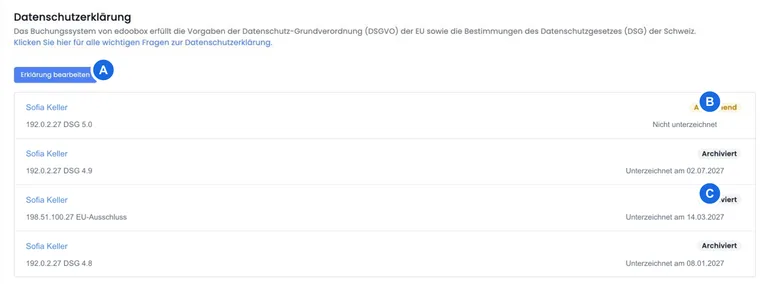
For the complete process, from the contract email to checking its status, see Sign and manage a data processing agreement.
Integrate legal texts into the booking process
Maintain your terms and conditions, privacy policy, withdrawal information and other mandatory notices under Settings: Legal. Publish only reviewed versions and add them in the Design Manager where information or active confirmation is required.
For multiple booking languages, each active language requires a complete, functionally equivalent text. Then test the entire booking process and check in the booking detail which version was confirmed.
To update existing texts, use Publish a new legal text version; existing links do not need to be recreated for each version. Check the text version and the copy of cancellation terms separately. For subscription sales, the additional subscription confirmation methods apply. The guide Legal texts, cancellation and records covers setup and ongoing administration.
Collect only necessary data
Check that each participant data field, additional question, tag and file upload has a clear purpose. Use required fields only when the information is actually needed to run the offer, fulfil a contract, handle billing or perform another documented task.
Avoid particularly sensitive information in free text note fields if a less sensitive process is sufficient. Separate newsletter consent, terms of participation, and voluntary information; a course booking is not automatically a marketing consent.
Grant access according to the principle of least privilege
Grant admin, instructor and API permissions only for the tasks actually required. Use granular user permissions, two-factor authentication or SSO, and separate API keys for integrations.
Remove admins who have left promptly, review active sessions and revoke unused keys. Avoid sharing a Superadmin account, as this makes it harder to trace who performed an action.
Plan retention, correction, and deletion
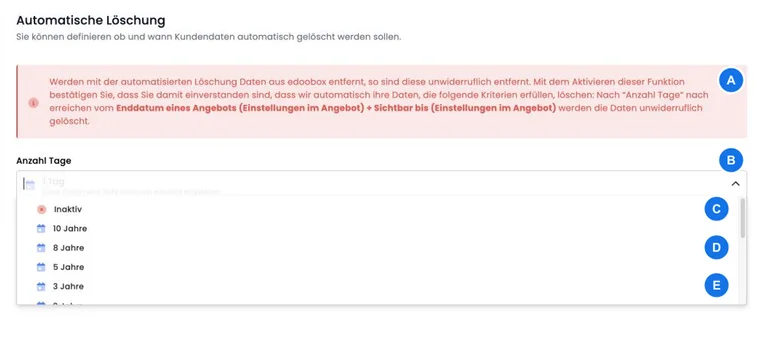
edoobox allows you to correct or permanently delete individual participants. You can also set an automatic deletion period for offers and associated data. The interface offers periods from one week to ten years; the former one-day option is disabled. However, when saving through the current interface, the API limits the value to 720 days. Higher values saved earlier or through other methods may differ. After saving, check the actual value stored before relying on a longer retention period. The automatic deletion guide explains this limitation. Activating a deletion period requires confirmation with DELETE.
Do not choose the period based on convenience. Coordinate statutory retention obligations, ongoing contracts, invoices, certificates, information requests, and internal deletion concepts. Export only data that is still lawfully required and stored securely.
Check integrations and data flows separately
An edoobox setting does not automatically cover every connected system. For payment providers, email services, Zapier, webhooks, the API, Google Analytics, Microsoft, Zoom and other services, document which data goes where, why it is processed and how long it is retained.
Check the required consent for tracking and marketing. Do not use tags or additional fields as a hidden alternative solution for a missing consent. Assess current sub-processors and possible cross-border transfers based on your agreements and official provider information.
Configure the technical tracking decisions via cookie banner and, if applicable, the consent handover in the iFrame. A confirmed contact address via Double-Opt-In and a confirmed legal text fulfill different tasks in the product.
Prepare procedures for requests and incidents
Decide internally who will review access, rectification and deletion requests, verify the requester’s identity and compile data from bookings, participant profiles, invoices, emails and integrations. The controller remains the point of contact for data subjects.
Also define a process for security incidents: internal reporting channel, assessment, documentation, contact with edoobox, and, if applicable, notification to the relevant supervisory authority. In support requests, send only the data necessary for analysis.
Data protection checklist before going live
Clarify roles, applicable law, and the data processing agreement.
Review legal texts and consents for each language and perform a test booking.
Reduce data fields, mandatory entries, tags, and uploads to what is strictly necessary.
Check admin rights, 2FA/SSO, and API keys.
Define a retention and deletion policy, including invoices and exports.
Document third-party providers, tracking, and payment and email data flows.
Define processes for data subject requests and security incidents.
Use cases
Use case: Launching a public course with data protection in mind
A Swiss education provider signs the appropriate agreement, limits its registration form to contact details and necessary course information, and publishes its privacy policy and terms and conditions in all booking languages. Newsletter consent is a separate optional field. A test booking verifies the display, required fields and saved legal text version.
Use case: Handling a deletion request from a participant
The responsible team verifies the request, locates the profile, bookings, emails and connected systems, and checks statutory invoice retention obligations. Data that needs correction is rectified, data no longer required is deleted in edoobox and connected systems, and the decision is documented internally.
Use case: Checking Analytics and Zapier before activation
An organization wants to use GA4 and a CRM handover via Zapier. It documents events and fields, checks consent and contracts, transfers only necessary data, and tests revocation and deletion in all involved systems. Only then are tracking and automation activated in production.