
Organization: Company and account information
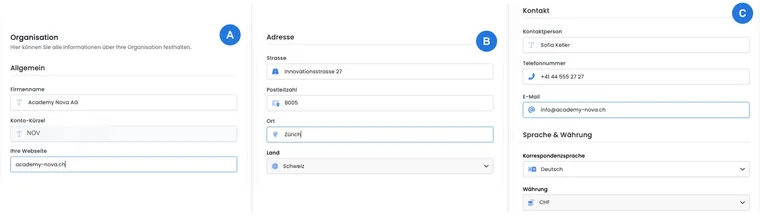
The organisation information contains the master data for your edoobox account. This is where you maintain your organisation’s name and contact address. A separate billing address is provided for billing your edoobox subscription and only becomes active when all the required details are complete.
Distinguish these account details from the data for individual offers, venues and participants. Changing the organisation’s address, for example, does not automatically replace the address of an existing venue.
Editable organisation details
Open Settings → Organisation. You can edit the following details in edoobox:
General: company name and website.
Address: street, postcode and town/city. These fields are required.
Contact: contact person, telephone number and valid email address.
Language: the account’s correspondence language.
For the website, you can enter an address with http:// or https://; edoobox normalises the saved value. After changing your domain, still check all publicly used links and email signatures.
Saving each field: organisation details and the separate billing address are saved when you change each individual field. There is no single final Save button for these details. Only close the view once saving has finished. If an error message appears, reopen the view and check the affected value.
Maintain the recipient of the internal registration information email
When enabled, the global internal Registration information email is sent to your organisation’s contact email address. Open Settings → Organisation and maintain the Email field under Contact.
This recipient address is separate from your email provider’s sender address and the selected recipient for edoobox account billing. If internal responsibilities change, update the appropriate address and then check a booking notification in the outbox. Internal registration information explains activation, the template and how this differs from other recipients.
Account properties that cannot be freely changed
Account abbreviation, Country and Currency are disabled in the organisation view. According to the interface, neither you nor edoobox Support can subsequently change the account abbreviation.
If the legal organisation changes so fundamentally that the country or account currency is no longer appropriate, plan the transition with Support before overwriting other master data. These disabled fields are not a normal address form.
An additional account or an internal area?
| Requirement | Planning |
|---|---|
| Internal and public courses for the same organisation with shared administration | Check internal categories and offers, tags and access conditions within the existing account. The data remains managed in that account. |
| An independent organisation with separate master data, admin assignments and account billing | Plan an additional organisation account. Its data, settings, plan and billing are managed separately. |
| One person manages several separate accounts | Use valid admin logins for each account and Multi-Sessions to switch between them. |
An internal area is not an additional database and does not have its own account billing. Likewise, using the same admin email address does not synchronise two accounts. Plan website links, designs, exports and any data transfers separately for each account. Before registering again, check additional costs and the contractual scope against the current terms; multiple accounts are not automatically included in your existing plan.
Change the organisation name while retaining the account abbreviation
- Open Settings → Organisation and change the desired display name under General → Company name.
- Leave the field, wait for saving to finish and reopen the view to check the result.
- Check relevant email and PDF templates containing organisation placeholders. You must separately update any manually entered names in a design, signature or description.
- Check the existing booking links and separate account billing address. The company name and the unchangeable account abbreviation are separate details; renaming the company does not assign a new account abbreviation.
Example: A new public organisation name
An organisation adopts a new display name. It changes the company name, checks templates containing organisation details and replaces old names in freely entered text. The existing account abbreviation is retained; renaming does not automatically move the booking links.
If you only want a clearer name on the SAML login button, change the SAML provider name. This does not involve changing the account abbreviation.
Set up a separate billing address
You can save a separate billing address for edoobox account billing. The following details are available:
Billing addressee or organisation
Cost centre
Street
Postcode and town/city
Telephone number
Email address
First enter the complete address, then activate it. If it is incomplete, edoobox prevents activation or resets an already active but incomplete billing address to Inactive. Therefore, check its status after every change.
Then check the selected recipient for billing emails under Settings → Billing. The separate billing address must be complete and active for its email address to be available as a valid selection there. Changing an address does not freely edit documents that have already been created and does not provide an editor for their email subject.
For special accounting requirements, read Which invoice are you looking for?. The “Invoice email” template and a participant booking’s separate billing address concern different documents.
Where organisation details take effect
Account management: the company name, contact and correspondence language help identify and manage the account clearly.
edoobox subscription: the separate billing address is intended for this account billing.
Templates: organisation details can appear wherever an email or PDF template uses the corresponding organisation placeholders.
Public display: these details only become visible in the booking process through a design or template that outputs them.
A change therefore does not necessarily have the same effect everywhere. Check the specific template rather than assuming that all text will be replaced automatically.
Checklist after a change
Change the required field and leave it so that the change is saved. Wait until the loading indicator finishes, then reload the organisation view to check the result.
Check whether any separate billing address is still Active.
Open a relevant email and PDF preview containing organisation placeholders.
Check the next account invoice under Account: Billing and account journal.
Example: Moving without changing the accounting address
An education provider moves premises. It changes the organisation’s street, postcode and town/city while retaining its existing complete central billing address. It then checks that this address is active and reviews an email preview containing organisation details.
Example: A central cost centre for the subscription
The operational contact address belongs to course administration, but the subscription invoice should go to group accounting. The organisation enters the billing addressee, cost centre, postal address and accounting email address in full, and only then activates the separate billing address.
Example: A new legal entity in another country
An account is to be managed by a legal entity in another country and with a different currency. Since country and currency cannot be freely edited, the team does more than change the company name: it first clarifies with Support how the account should be continued or migrated properly.