
edoobox account subscriptions
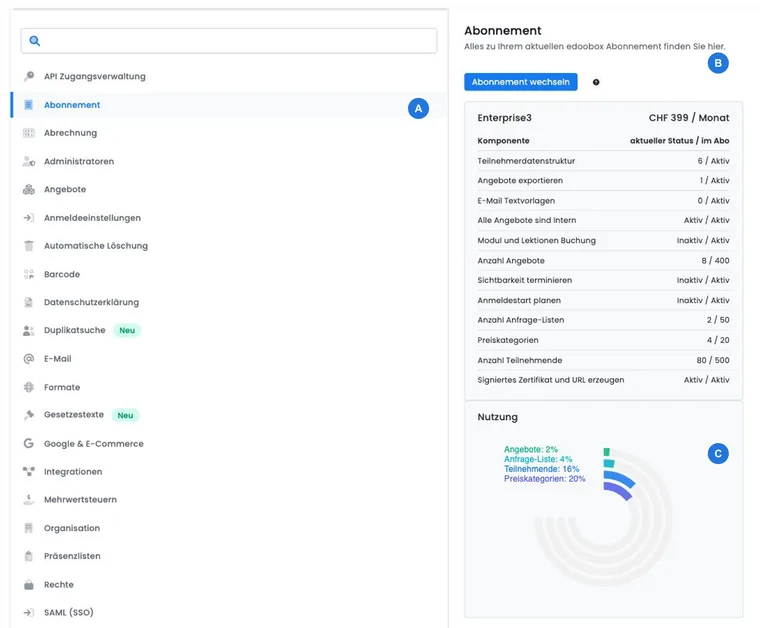
Subscription settings shows which edoobox package is active, which limits and features it includes and how much your account already uses. This comparison is the most reliable basis for switching: current prices, package names and allowances are loaded from the edoobox server and may vary by contract, country or offer.
Change a subscription only after you have reviewed capacity, features used in production, and billing. A cheaper package is only selectable if the current usage fits entirely within its limits.
Who can change the subscription
Open Settings and the Subscription area. All authorized admins may use the current subscription information in their work; only someone with Superadmin rights can open and confirm changes in the subscription manager.
This ensures that a package change remains a deliberate account decision. Therefore, agree on the change, budget, and required features with the person responsible for the contract and billing.
Reading the current status and usage correctly
The overview compares two values for each relevant feature or limit:
Current status: What your account is actually using at the moment, for example the number of offers, participants, offer lists, or price categories.
In subscription: Which limits or features the active package provides.
For numerical values, you see usage and package limit. For features, it is indicated as Active or Inactive. The usage graph makes capacity bottlenecks visible but does not replace the detailed review of individual features.
Check the display particularly before publishing a new programme. This helps you identify in time whether additional offers, larger groups or more price categories require a package change.
Participants and price categories per offer: The participant value is the highest configured maximum number of participants of a considered offer, not the total number of your customer profiles or all previous bookings. For price categories, the highest number of active price categories in a considered offer is counted. Therefore, in case of a change block, check the capacity or the active price categories of the affected offers; deleting arbitrary customer profiles does not resolve these limits.
How offers with multiple dates are counted
The offer limit counts the offer, not each associated lesson or venue. Non-archived, non-deleted offers with status «Published» or «Guaranteed to run» are included. The account’s current usage display shows the applicable state.
| Structure | Impact on the number of offers |
|---|---|
| A course with ten dates, possibly at different locations | One offer, provided the dates are assigned to the same considered offer. |
| Ten separately created workshops | Ten offers, provided all have the considered status. |
| An offer with individually bookable lessons | The lessons do not become additional offers. The package right for lesson booking must be checked separately. |
Before a package decision, check the date structure and the actual counter under Settings → Subscription. A different course format alone does not increase limits. Archive productive offers only after reviewing their bookings and links.
Compare packages by workflow
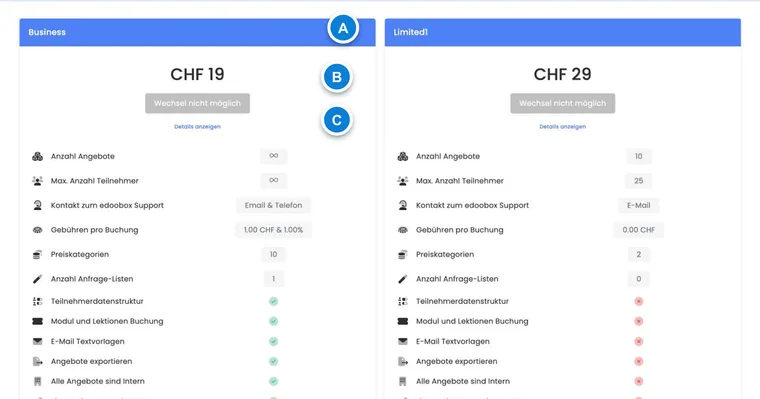
Click on Change subscription. The manager loads the currently available packages in the order specified by the server. Each card shows its current values and feature characteristics; the active package is marked as selected.
| Review area | Why it is important for selection |
|---|---|
| Capacity | The number of offers, participants, offer lists, and price categories must fit peak operations. |
| Booking process | Free date selection, group registration, waiting list, MustPay, promotions, and timed publication may be package-dependent. |
| Content and communication | Custom email templates, data fields, imports, exports, and custom sending routes are crucial for more complex workflows. |
| Access and integration | Internal offers, external login providers, OAuth/API connections, and website embedding must be maintained. |
| Evidence and operations | Support, certificate validation, payment functions, and fees per booking affect daily operations and costs. |
Do not compare only the current average. A package should also cover booking peaks, upcoming offer series, and already planned integrations.
Distinguish between free offer and edoobox costs
A participation price of 0 means you charge no course price for that offer. It does not cancel your edoobox account’s software subscription. Check package price, included services, any booking fees, paid plugins and chargeable delivery separately.
- Open the current subscription cards and compare the base price and displayed fees per booking.
- Check additionally activated services in the Plugin Manager.
- After usage, compare the line items in the account journal.
Example: A free information event can generate participant bookings even if the course price is 0. Which edoobox fees apply for this is determined by your current package. Fees from an external payment provider are assessed separately based on the payment method actually used; the course price alone does not answer this question.
Change subscription
Open the subscription manager as Superadmin.
Compare the displayed cards with the current status of your account.
Select the desired package and check the confirmation dialog.
For an EUR account, additionally confirm the displayed waiver of the right of withdrawal, if required.
After successful selection, edoobox opens a receipt. Afterwards, check the package name, usage, and account journal again.
If you then prepare a payment or subscription invoice, change the package first. The amount will then be based on the updated account balance. See Create your own subscription invoice for the process.
Why a downgrade is blocked
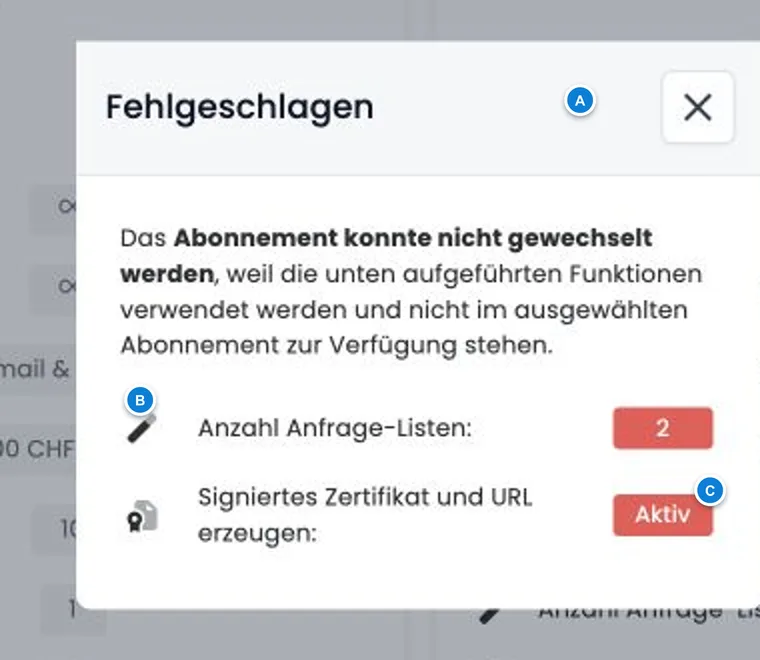
edoobox compares the current account status with each target package. The change is not possible if a numerical usage is above the new limit or if a feature active today is missing in the target package. The button remains disabled in that case, and Show details opens the specific blocking reasons along with the current value.
Typical causes are too many published offers, participants, offer lists, or price categories, as well as active features such as custom data structures, free date selection, internal offers, export connections, or external login providers. The actually displayed list is always decisive.
Prepare a downgrade carefully
Open the details of the desired target package and note each blocking reason.
Determine which offers, data fields, logins and integrations your workflow still requires.
Reduce or deactivate only features whose impacts are known and internally coordinated.
Test affected booking paths, emails, website integrations, and accesses again.
Reload the manager and check whether no blocking reasons are displayed anymore.
Test account and renewal code
In test mode, edoobox shows the end date stored in the account. If a renewal code is provided for your account, a separate input field appears below it. After successful entry, edoobox updates the expiration time and returns to the dashboard.
You can identify the current test duration and the availability of a code exclusively in your account or in the confirmation from edoobox. Use the test phase for complete trial bookings, emails, payment methods, cancellations, and roles, not just for creating an offer.
If your account remains in the normal test package, its expiration leads to the view for selecting or activating a package. The test end date does not confirm an already completed paid package change. Check the actually active package name before the end: If you have deliberately already chosen a paid package, its billing and contract terms apply.
Manage plugin test phases separately in the Plugin Manager. The rules displayed there apply to their continuation and costs. The continuation of configured data in the same account is explained in Switching from test to paid account; if not used, read Non-use, cancellation, and deletion.
Checklist before and after the change
Document current usage and all blocking reasons.
Take into account planned peaks in offers, participants, and price categories.
Check internal offers, custom data fields, email templates, login providers, imports, and exports.
Check price, currency, fees, and confirmation in the manager.
After the change, check the receipt, account balance, and productive workflows.
Use cases
Practical example: Increase capacity before the autumn season
An education provider plans 40 additional courses and significantly larger groups. The Superadmin compares the current status with the offered packages and selects a package that also covers the highest expected number of offers, participants, and price categories. After the change, the accounting department checks the receipt and account balance.
Practical example: Features block a downgrade
An organization wants to choose a smaller package. The details list an active internal feature, an external login provider, and custom participant data fields. The team first checks which internal courses and SSO accesses depend on these. Only after migration and testing are no longer needed features deactivated and the change restarted.
Practical example: Change an EUR package and file the receipt
A company with an EUR account selects a new package. The authorized Superadmin person reads the confirmation dialog, accepts the required waiver of the right of withdrawal, and completes the change. Afterwards, the accounting department files the displayed receipt and creates the desired payment only subsequently.
Distinguish account subscriptions from participant subscriptions
Your edoobox account subscription defines your organization's software package. Configure subscriptions sold to your customers in the Subscription Manager for participant subscriptions. A company card for edoobox account costs does not thereby become your participants' payment source.
The separate tasks are described under Company card, monthly debit and Business top-up and Pause or delete an account.